Skip to content
Typography Journal:

The awesome Mac OS Catalina fonts you didn’t know you had access to

  • Apple has recently licensed fonts from type foundries such as Commercial Type, Klim Type Foundry and Mark Simonson Studio to be used as system fonts on Mac OS Catalina. But since these fonts are an optional download, many users of Mac OS X are not even aware they have access to them for free.
· 320,323 views · 21 comments

To see and install these optional fonts, open the FontBook application and switch to “All Fonts”. Browse the font list and you will see lots of font families that are greyed out—either because they were deactivated or they weren’t downloaded yet. If you right-click on a font or font family that wasn’t downloaded yet, you see an option to download the individual font or entire family. 
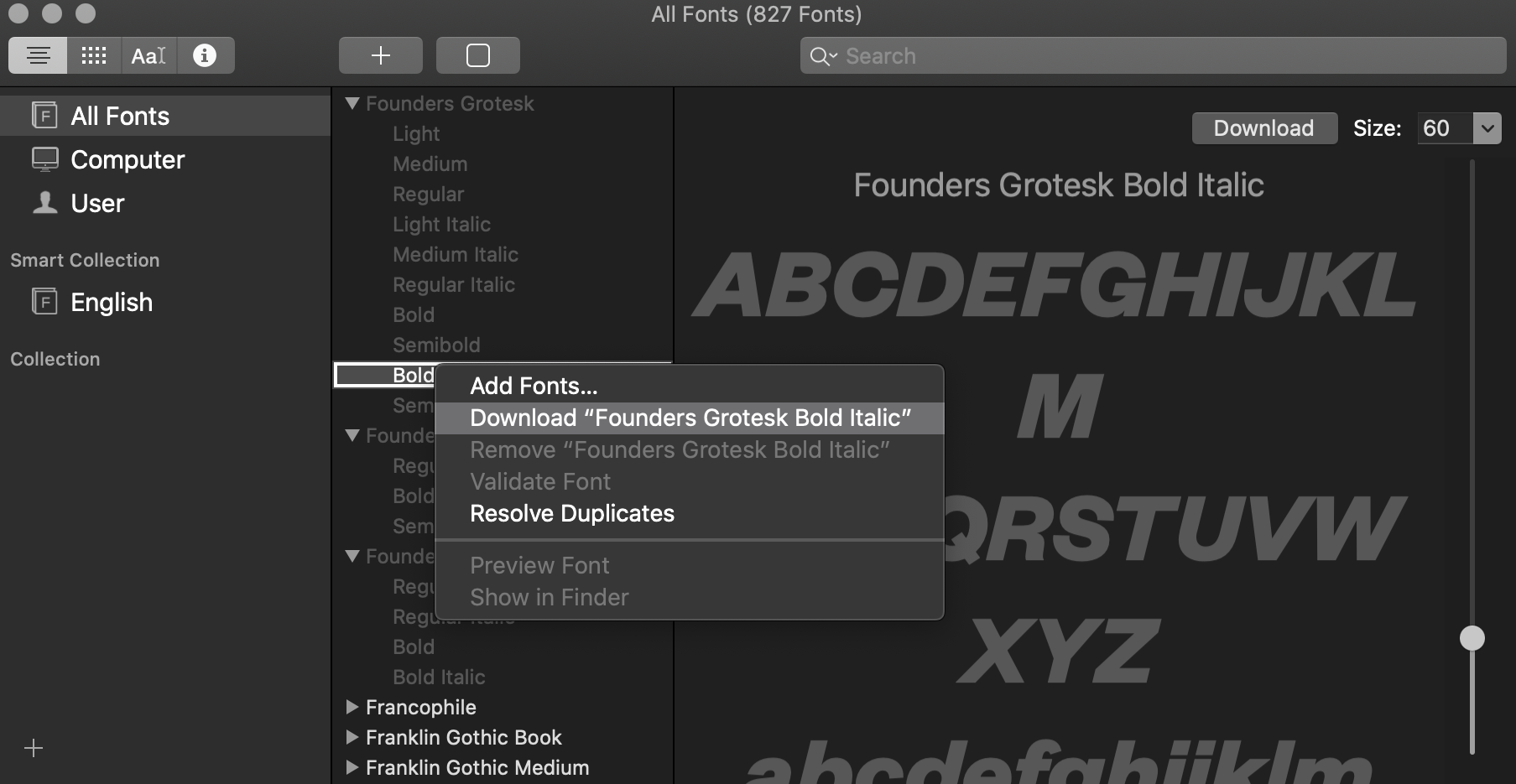
catalinafonts.png

Here are some (Latin) highlights of the available fonts:

catalino-optional-fonts2.jpg

In addition to those Latin fonts, many non-latin fonts are available as well. For a complete list check out this support document. 
☞ https://support.apple.com/en-us/HT210192

User Feedback

Recommended Comments

Joe Vains

Standard Member

Thank you very much for this tip. Just to be able to use Proxima Nova is great news!

garrettstoffel

Standard Member

I can find every font listed except Proxima Nova. And thats the one that I got excited for. 

Soren Severin

Standard Member

Great, but what about license details – what kind of usage is permitted? I can't seem to find any EULAs anywhere. Is it for instance permitted to use the fonts to create brand marks – that might be copyrighted? Does anybody know where to find legal information about usage rights?

Richard

Standard Member

I have always wondered how is with the licensing of the these ‘system fonts’. Let’s say i do use the Proxima Nova in my commercial print design/video production. I did not actively ‘pirated’ the font, yet it is natively part of my type dropdown. Others will have to cash out few hundred dollars to get them to even appear there. What is the right way to approach this? Should one always check that font they use is commercially available and if so than to pay the licence?

13 minutes ago, Soren Severin said:

Great, but what about license details – what kind of usage is permitted? I can't seem to find any EULAs anywhere. 

The Mac OS Eula applies. Like with other bundled OS fonts, there are very few restrictions. You just can’t move the files away from the system and you can’t override the embedding restrictions. 

Here is the Eula: https://www.apple.com/legal/sla/docs/macOSCatalina.pdf

The relevant part is:

Quote

E. Fonts. Subject to the terms and conditions of this License, you may use the fonts included with the Apple Software to display and print content while running the Apple Software; however, you may only embed fonts in content if that is permitted by the embedding restrictions accompanying the font in question. These embedding restrictions can be found in the Font Book/Preview/Show Font Info panel.


Soren Severin

Standard Member

Great, thank you.

CapeWRT

Standard Member

Do I assume there is no way to utilize these new system fonts on older systems (High Sierra)? - I only have MB Pro (early 2013). Be nice if possible... Any advice (besides buy new Mac)?...


Thanx, Bill T

On 5/27/2020 at 9:07 PM, CapeWRT said:

Do I assume there is no way to utilize these new system fonts on older systems (High Sierra)? - I only have MB Pro (early 2013). Be nice if possible... Any advice (besides buy new Mac)?...

I checked the documentation and it sounds like the download feature was available in earlier versions of Font Book as well. So someone could try to see if the new fonts appear there as well. 

Riccardo Sartori

Standard Member
2 hours ago, Ralf Herrmann said:

the download feature was available in earlier versions of Font Book

Correct. It is for a number of non-Latin fonts.

2 hours ago, Ralf Herrmann said:

someone could try to see if the new fonts appear there as well

They don’t.

As I wrote elsewhere, but could be of interest pointing out here too, older macOS versions don’t even get an updated Apple Color Emoji font.

Create an account or sign in to comment

Important Information

We are placing functional cookies on your device to help make this website better.

Account

Navigation

Search

Search

Configure browser push notifications

Chrome (Android)
  1. Tap the lock icon next to the address bar.
  2. Tap Permissions → Notifications.
  3. Adjust your preference.
Chrome (Desktop)
  1. Click the padlock icon in the address bar.
  2. Select Site settings.
  3. Find Notifications and adjust your preference.