
Skip to content

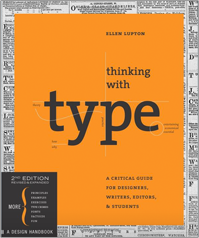
Thinking with Type

(1 review)
  • Released/Published: 2010
  • By: Ellen Lupton
  • Publisher : Princeton Architectural Press
  • ISBN: 978-1568989693

Thinking with Type is the definitive guide to using typography in visual communication, from the printed page to the computer screen. This revised edition includes forty-eight pages of new content, including the latest information on style sheets for print and the web, the use of ornaments and captions, lining and non-lining numerals, the use of small caps and enlarged capitals, as well as information on captions, font licensing, mixing typefaces, and hand lettering. Throughout the book, visual examples show how to be inventive within systems of typographic form—what the rules are and how to break them. Thinking with Type is a type book for everyone: designers, writers, editors, students, and anyone else who works with words. The popular online companion to Thinking with Type (www.thinkingwithtype.com) has been revised to reflect the new material in the second edition.
User Feedback

Create an account or sign in to leave a review


Thinking With Type is fun for the eyes and for the most part a good primer on multiple aspects of working with words, but it stumbles hard in few place, making factually incorrect assertions or offering dubious advice. The most flagrant errors are concentrated in the content new to the expanded second edition, so finding a first edition may be advisable. Otherwise, Jan Middendorp’s Shaping Text covers largely the same content and is a generally superior book.

Of the book’s three sections, the second (“Text”) is by far the strongest, with crisp and thought‐provoking essays like “Errors and Ownership” and “Birth of the User”

Important Information

We are placing functional cookies on your device to help make this website better.

Account

Navigation

Search

Search

Configure browser push notifications

Chrome (Android)
  1. Tap the lock icon next to the address bar.
  2. Tap Permissions → Notifications.
  3. Adjust your preference.
Chrome (Desktop)
  1. Click the padlock icon in the address bar.
  2. Select Site settings.
  3. Find Notifications and adjust your preference.