



- By: Matt LaGrandeur
- Platform: Browser
- free
- Purpose: Type Design
Glyphr Studio is a free, web based font editor.
Features:
- Editing Tools: Create complex vector shapes, copy & paste, flip them around or lock them down, drag & resize to your heart's content. Lots of the normal stuff you’d expect, like a pen tool, guidelines, keyboard shortcuts, and Undo history.
- Linked Shapes: Define a shape once, like an o, and re-use it across many characters, like bdgpq. Make changes to the Linked Shape, and it updates all the characters linked to it.
- Test Drive: Try out your font as you type. Pack my box with five dozen liquor jugs!
- Ligatures: Combine a sequence of characters into one new supercharacter, like Æ or ¼. POW.
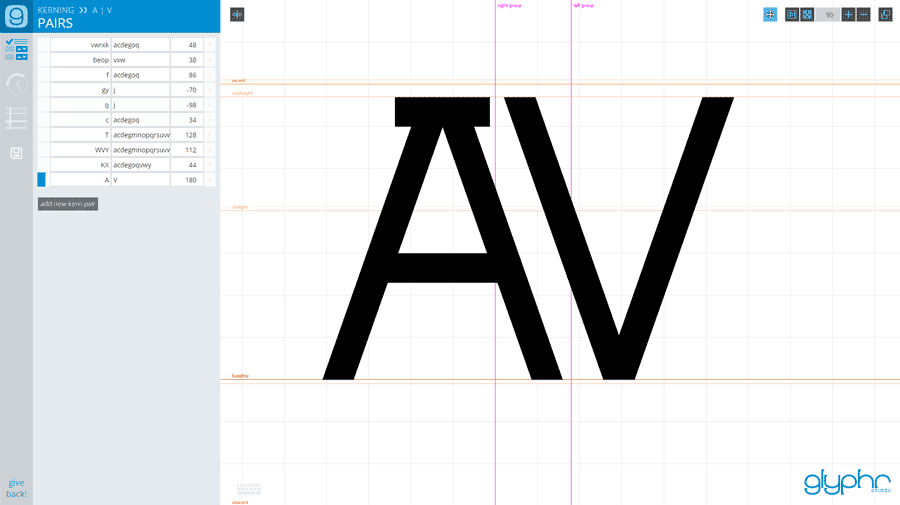
- Kerning: Standard character spacing feeling awkward like a gradeschool slowdance? Kerning gets characters together and feelin’ good.
- Import SVG Fonts or outlines: Use your favorite vector editing program to create vector outlines, then import them to characters via SVG. Or open a whole SVG Font at once.
- All the Chars: Easily select some common Unicode character ranges to design, or input arbitrary ranges - up to U+FFFF. That’s 65k characters of excitement.
- Two Screen Mode: spread out and use your big beautiful second monitor. Tools on one screen, editing on the other.

Create an account or sign in to leave a review
There are no reviews to display.