Skip to content

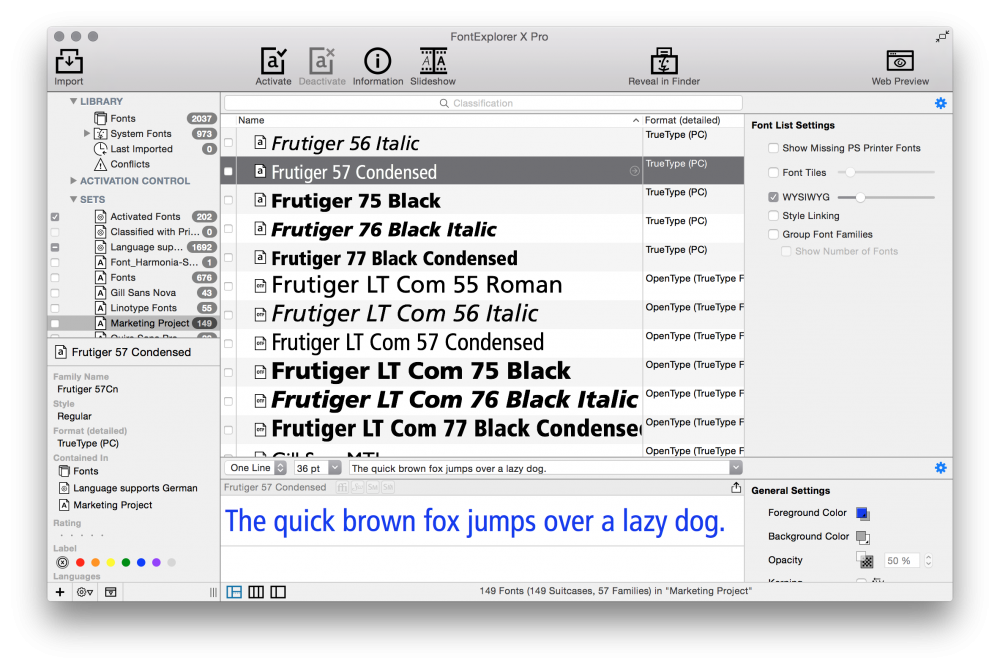
FontExplorer X Pro

(1 review)
  • By: Monotype
  • Platform: Windows, Mac OS
  • commercial
  • Purpose: Font Manager

FontExplorer X Pro is a commercial font manager from Monotype. 

Some features:

  • user-defined sets and smart sets, e.g. fonts by language support
  • Systemwide auto-activation of fonts
  • Clear system and application font caches (Adobe, Microsoft, Quark)
  • Fonts.com subscription fonts or Google Fonts via SkyFonts delivery technology
  • Activation control with application-based sets and font request view
  • Customizable Print functionality
  • Import, organize and preview Web Fonts (WOFF and EOT formats)
  • Integrated font store

User Feedback

Create an account or sign in to leave a review


Regarding features, speed, usability, stability, … this is the best professional Mac font manager for me. 

The only thing I dislike is the upgrade policy. Compatibility with new OS versions and the third-party apps (in the form of the auto activation an essential part of a font manager) is only ensured in the latest version. So you are forced to buy the upgrade (for half the price of the new license) year after year, whether or not the upgrade brings any new features you are interested in. 

Important Information

We are placing functional cookies on your device to help make this website better.

Account

Navigation

Search

Search

Configure browser push notifications

Chrome (Android)
  1. Tap the lock icon next to the address bar.
  2. Tap Permissions → Notifications.
  3. Adjust your preference.
Chrome (Desktop)
  1. Click the padlock icon in the address bar.
  2. Select Site settings.
  3. Find Notifications and adjust your preference.