Skip to content

Typography Journal

Articles from the field of typography.
I began reading books about Renner and Kramer to straighten my mind about who really made the first design of Futura. At the end Futura is even today one of the most popular typefaces.
Right or wrong?
The book by Christopher Burke about Paul Renner (Hyphen Press, 1998) was a good start to read. The second was an article by Burke about ‘The Authorship of Futura’ in Baseline 23 (1997) that should bring me on the right track. In this article Burke widens this authorship to the design staff of Bauer Type Foundry. Not strange when you look at the complex production of a typeface in that period of time, but sadly it makes my research not easier. Technical support by foundries played a big role in almost every type design in the lead era. Often the typedesigners where artists or architects by profession and could not oversee all the aspects of the production process. Luckily Burke also gave some publications to read further. One is an article from the author Hans Peter Willberg (Tiessen, 1969). Willberg writes that Kramer was a student at the Städel-Schule in Frankfurt in 1925 and that he made there the first drawings on which Renner based his design on Futura. But Kramer was in 1925 already a well-known architect and product designer and was working at the building department of the city of Frankfurt. He never attended the Städel-Schule as far as I know. Renner began with his first drawings for Futura in 1924 and winter 1924/25 first cuts of Futura were already done by Bauer Type Foundry. So both assertions of Willberg where wrong.
Setting the dates
The most used piece of evidence about Kramer-Grotesk is a sheet of paper that shows capitals of Futura with some of them in outline that are crossed out. Elsewhere on the sheet alternative characters for the crossed out capitals are enclosed [picture 1]. In a lot of publications this sheet is dedicated to Kramer.

Picture 1: Bauer, Konrad F., Wie eine Buchdruckschrift entsteht, 1958
So I had to figure out when this designsheet was first published and why it was attributed to Kramer. Since most of the material of Bauer Type Foundry is supposed to be destroyed during World War II I first looked at publications from before this war. One important publication is an article by Denis Megaw in ‘Typography 7’, published in 1938. On page 34 drawings are shown that are presented as the first designs of Futura by Renner. These are the lower case characters and capitals that are placed on top of the page in picture 2.Below this a complete set is shown from Futura as published by Bauer in 1927 in its final form (without the extra alternative characters).

Picture 2: Megaw, Denis, Typography 7, 1938
The sheet of paper with sketches [picture 1] show in black more or less the definitive forms of the capitals of Futura while the outline forms are showing his first designs from 1924 for the A and K as in Megaw’s article. An invitation card for a lecture dated 3. July (1925) [picture 3] made with trial cuts of Futura by Bauer show also these capitals that are in a state between the first designs in the article from Megaw and the final ones on the same sheet. 

Picture 3: Luidl, Philipp and Lange, Günter Gerhard, Paul Renner (Eine Jahresgabe der Typographischen Gesellschaft), 1978
Look for example at the M, N and R. The same story is told by a trial setting that was made for the publication ‘Schrift’ by F.H. Ehmke that was published on July 9th 1925 [picture 4]. 

Picture 4: Ehmcke, F.H., Schrift, ihre Gestaltung & Entwicklung in neuerer Zeit, 1925
You have to keep in mind that at that time making a book would have taken several months from concept to printed matter. As described by Paul Renner in ‘From Georg-Müller book to Futura and Meisterschule; recollections by Paul Renner’ (translated), published in 1940 and 1943, he reports that he showed slides (Lichtbilder) of Futura by Bauer Type Foundry already in February 1925 during lectures at large printing firms in Cologne and Mönchengladbach.
Renner meets Kramer
In May 1925 Renner moves from Munich to Frankfurt to teach at Fritz Wicherts Frankfurt Art School (the former Städel-Schule). He also meets Wicherts friend Ernst May who is head of the building department of the city of Frankfurt. Another person he met was the architect Ferdinand Kramer who was also working at this department. Ernst May had ambitious plans for rebuilding parts of the city of Frankfurt. A lot of inspiration for the plans came from the Bauhaus and buildings of the Stijl in The Netherlands. One of the examples also published in the magazine ‘Das Neue Frankfurt’ was De Unie in Rotterdam by Architect Oud. On that building geometrical sans serif typography is clearly an essential part of the architecture. May asked Renner to deliver a typeface that could be used in architecture as well as on shops, advertising and small structures like bus stops. I think that the sheet that was delivered by Renner to the building department is the sheet that also can be found in the ‘Werkkatalog Ferdinand Kramer 1923-1974’ by Jochem Jourdan.
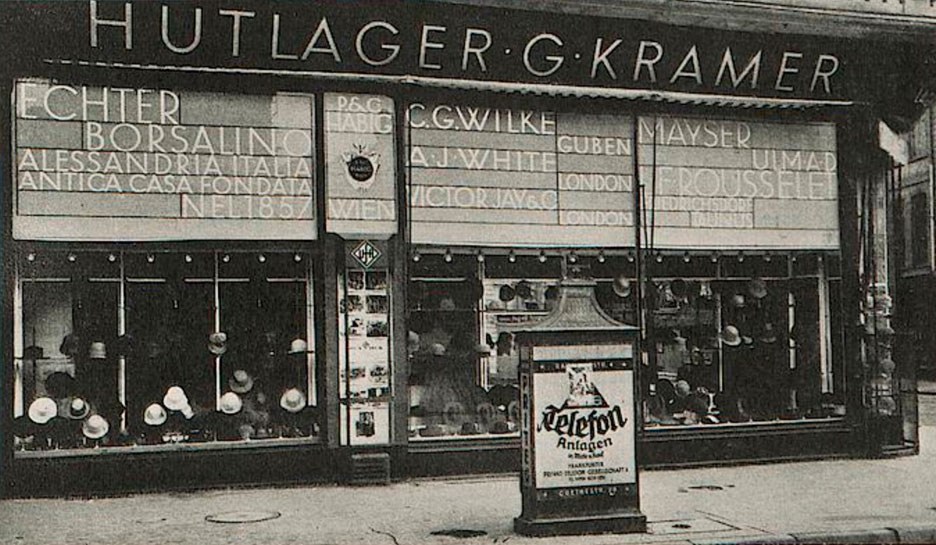
In this ‘Werkkatalog’ the designsheet of letterforms is dated 1925 on the back (according to Jourdan). The stencil typeface on the left of picture 5 is not discussed in origin, dated 1952, and made by Kramer. With the sheet to the right the discussion of the Kramer-Grotesk started but it is a different sheet than the one most publications about Kramer-Grotesk use to discuss this issue. For example in ‘Baseline’ (‘The authorship of Futura’ by Chistopher Burke) and several other publications the sheet in picture 1 is presented as the Kramer-Grotesk sheet. I think the sheet from the ‘Werkkatalog’ was credited to Kramer simply because it was found in his archive. I personally think that this is a copy or the original that Renner delivered at the building department for copying and distributing to letter sign firms and architects that worked in Frankfurt. There are some slight differences between the characters (for example the J and S) between the trial settings from 1925 of Bauer Type Foundry and the capitals on this sheet but that could be a design decision by Renner for the architectural purpose of this set. ‘Das Neue Frankfurt’ [picture 6] in january 1927 shows the typography of the fassade of the hat shop of Ferdinand Kramers parents in Frankfurt using the capitals of Futura. This design and the design of a second shop fassade on that page is credited to Renner. Also the name of the typeface (Futura-Groteske) is mentioned in the caption of the second picture. Some slight alternations to the characters can also be caused by sign makers who had to take over the letterforms from the drawings of Renner. At that time no computers, scanners or laser equipment where available to do that. 

Picture 6: Behne, Adolf, ‘Kultur, Kunst und Reklame’ in: Das Neue Frankfurt 3, 1927 (digital file uni-heidelberg)
Renners design process
I think that looking at the consistence of the design process of Futura by Renner there can be no doubt that Kramer-Grotesk is a myth. The drawings on picture 1 can clearly be seen as stage three in the design process. The first step was the line ‘Die Schrift unserer Zeit’ from 1924 from which all started (not available but mentioned in Renners writings), second where the drawings in ‘Typography 7’ (picture 2) and third was to my opinion the much discussed sheet from picture 1. The crossed-out capitals on that sheet match with the earlier design of the capitals of the top drawings in picture 2. It can be seen as a logical step to the trial settings of picture 3 and 4 in 1925. The sheet found in the Kramer Archive has to be looked at as a separate design of Renner but fits in the stage of the design of Futura at that moment. For me and for most typedesigners it is also quite clear that it would almost impossible to draw ‘out of the blue’ an alphabet with such a quality and consistance between the characters, especially when you hardly have any experience in graphic design like Ferdinand Kramer had. Although Renner was also not a typedesigner by profession he was 23 years older than Kramer and had loads of experience in graphic design, had been teacher in graphic design at his own school and had already written a well-received book about typography. There is a sheet with a stencil typeface [picture 5 on the left] in the Kramer Archive that is to me clearly a typeface design of an architect. Drawn on the drawing table with rule and compass. The ‘B’ with the same top and bottom curve, the ‘S’ with a top that is too large and an ‘O’, ‘Q’ and ‘G’ that has the same vertical and horizontal line thickness. And that typeface is dated 1952, a quarter of a century later. See also picture 11 with the timeline of the alledged Kramer-Grotesk designsheet. Of course there where architects like Peter Behrens who created typefaces but mostly architects who did where more active in graphic design and typedesign than Kramer and did this with support of a very experienced design staff of a foundry. Kramer-Grotesk on the contrary is supposed to be created without that help. 

Picture 7: Hahn, Peter, Ferdinand Kramer Architektur & Design, 1982
One of the publications that helped me a lot in this research was the thesis of Charles C. Leonard ‘Paul Renner and Futura: The Effects of Culture, and Social Continuity on the Design of Type for Printing’ that he published in 2005/2006. Leonard thoroughly researched the drawings shown in ‘Typography 7’ as well as the disputed design sheet from ‘Wie eine Buchdruckschrift entsteht’ (How a new printing type is made) of Bauer Type Foundry in 1958 [picture 8].

Picture 8: Bauer, Konrad F., Wie eine Buchdruckschrift entsteht, 1958
It is very interesting to see how he did a lot of work comparing designsheets of Renner (see picture 12). The ‘Kramer-Grotesk’ sheet shown in picture 5 on the right has the same cap-height and could easily be put in the comparison and would match the other two. One thing that Leonard presumes falsely is that the designsheet (picture 1) from 1958 was a reprint of the publication of Bauer from 1931 [picture 9].

Picture 9: Bauer, Konrad F., Wie eine Buchdruckschrift entsteht, 1931
This publication was completely different. Bauer Type Foundry used this first publication to promote the typeface Beton from Heinrich Jost that was new in 1931. All the illustrations and text went about that typeface. In 1958 the publication had as subject Futura that was a longrunner in sales at Bauer. So the designsheet of Futura that was published in the 1958 publication was first published in that year and never before as far as I know. So I think that this sheet was never even near Kramer as presumed by Christopher Burke in the caption of Baseline and has always been in the archive of Bauer Type Foundry (untill WW-II) being one of the designs of Renner. In the caption of the 1958 publication of Bauer the design is dated 1925 but because Renner showed first cuttings during lectures in february 1925 (see above) and Burke also writes that first trial cuts by Bauer were done in the winter of 1924/25 I think that this could also be an earlier design and maybe has to be dated before the trial cuts were made.
Recent publications
Recent publications from 2016 that publish the discussed design sheet from picture 1 are ‘Futura. Die Schrift.’ and ‘AllesNeu!’. They are a feast for the eye showing a lot of type specimen and printed matter with Futura. In ‘Alles Neu!’ some strange things are happening. The publication ‘Schrift’ by Emcke with a preliminary test (Vorprobe) of Futura is dated at 1926/27 while above in the picture the date of July 9. 1925 is even quite visible. On the same page the designsheet [picture 1] that was dedicated to Renner at first publication in 1958 is suddenly subscribed to Ferdinand Kramer. The source of the picture is not given. The article of Katherina Pennoyer with the subtitle ‘So far unknown facts and details’ (bisher unbeachtete Fakten und Details) indeed gives some more details that according to her gives Kramer a bigger role in the creation of Futura. She writes again that Kramer studied at the Städel-Schule in Frankfurt (p. 99). As written before Willberg introduced this false story in 1969 (see above). I cannot find any proof of that (see picture 8: Timeline Renner and Kramer). About the text of Paul Renner on his recollections of the design of Futura, published in 1940 and 1943, Pennoyer writes: ‘It seems that the story was written by those who earned money of it’ (Es hat den Anschein, dass die Geschichte von denen geschrieben wurde, die daran verdienten). So according to her Renner did not write the article about that important part of his life himself. But Renner never rejected the article and accusing him and Bauer Type Foundry of a story that is false is far beyond the reputation of Paul Renner and Georg Hartmann, who was beside being owner of Bauer Type Foundry also a bibliophile and patron of the arts in many ways. I think we should leave that remarkeble text to the responsibility of Pennoyer and the publishers of ‘Alles Neu!’. Her mentioning that Renner and Kramer could have met in 1919 when they both where living in Munich can nowhere be verified. Renner left Munich in 1919 and Kramer came to live there in 1919 (see timeline picture 10). Renner was also 23 years older than Kramer and could have had a totally different circle of friends. But ‘never say never’, Renner had to be sometimes in Munich for his work for the publisher Georg Müller and I would gladly like to get information about them meeting at that time and place.

Picture 10: Pohlen, Joep, ‘Timeline Renner-Kramer’, Roermond, 2017
The book ‘Futura. Die Schrift’ is thoroughly written and researched. Of course the famous sketches page [picture 1] is also present in this publication but it is left in the middle who made it actually. Interesting is however that this picture is taken from a whiteprint (Lichtpause) from the Klingspor Museum. So another source than the earlier publications (picture 11).

Picture 11: Pohlen, Joep, ‘Designsheet Paul Renner (also known as Kramer-Grotesk)’, Roermond, 2017
According to the author Petra Eisele the whiteprint is 98% of the original. And that is peculiar because whiteprints where copied in contact with the original using the diazolid (or Ozalid) process. So it should be 100% or close to it. I asked specialist Ed Kemmerling who worked for 28 years in the business of copying architectural drawings. He also thought that 98% is quite a difference. The aim is 100% because builders often use it to measure. But a difference is not impossible according to the process and machines used. I mailed with Klingspor Museum to learn how this whiteprint got in their collection but the answer is that they don’t know because they have it for a long time. But Klingspor has also proofsheets showing trials of letters with some characters glued over earlier letters. And on some sheets all the letters are glued on separately. These sheets are shown for example on page 38-41 in ‘Futura. Die Schrift.’. These must to my opinion descend from the studio of Bauer Type Foundry because there is a typical way of working to reach the final design. They are dated in the book from 1926 to 1928. The source that delivered them to Klingspor could also have delivered the sheet from picture 1 that is in their archive. But that’s speculation …
Conclusion
The thing that remains and is hard to understand is why Ferdinand Kramer did not protest against this so-called Kramer-Grotesk that was published in several important publications like the Bauhaus-Archiv publication ‘Ferdinand Kramer Architektur & Design’ in 1982 when he was alive and kicking (although he was at that time 84 years old). Kramer was an architect who had a very good reputation as product designer and architect and one could say that he did not need this credit for Kramer-Grotesk. The capitals of Futura were already developed in the definitive form in the beginning of 1925 but the lower case characters still had to go a long way to meet the final design. Maybe the development of this lower case letters were part of the discussions Renner had with Kramer and it could be that the huge transformations of these designs strengthened Kramers idea that he participated in the design of Futura. But Renner discussed it with more people. I also read somewhere that according to the wife of Jan Tschichold he also thought that he had contributed because he discussed the design with Renner. Neumann mentioned in his article in ‘Ferdinand Kramer’ from 1991 that Kramer did say (gesprächsweise) that he considered himself as one of the ‘fathers’ of Futura. This is all speculation but I can find no other reason why Kramer did not reject the publication of Kramer-Grotesk and his role in the design of Futura like stated in the caption on page 33 in the Bauhaus-Archiv publication [picture 7].
Despite the findings this story leaves an odd taste in my mouth about the role of Ferdinand Kramer. Or maybe the ones that believe they serve his legacy. With my limited knowledge I think that Kramer himself never wrote about designing Kramer-Grotesk. But maybe others can look into that and could find more about Kramers personal view about this. 
Joep Pohlen, May 2017
 
Literature:
Bauer, Konrad F., ‘Wie eine Buchdruckschrift entsteht’, 1931, Frankfurt (DE) Bauer, Konrad F., ‘Wie eine Buchdruckschrift entsteht’, 1958, Frankfurt (DE) Behne, Adolf, ‘Kultur, Kunst und Reklame’ in: ‘Das Neue Frankfurt’ 3, 1927, Frankfurt (DE) Burke, Christopher, ‘The authorship of Futura’ in: Baseline 23, 1997, East Malling (UK) Burke, Christopher, Paul Renner, the Art of Typography, 1998, London (UK) Ehmcke, F.H., ‘Schrift, ihre Gestaltung & Entwicklung in neuerer Zeit’, 1925, Hannover (DE) Eisele, Petra, Ludwig, Annette and Naegele, Isabel, ‘Futura. Die Schrift.’, 2016, Mainz (DE)  Hahn, Peter, ‘Ferdinand Kramer Architektur & Design’, 1982, Berlin (DE) Hansert, Andreas, ‘Georg Hartmann (1870-1954), Biografie eines Frankfurter Schriftgießers, Bibliophilen und Kunstmäzens’, 2009, Vienna (AT)  Kemp, Klaus and Wagner, Matthias K., ‘Alles Neu!, 100 Jahre Neue Typografie und Neue Grafik in Frankfurt am Main’, Stuttgart, 2016 (DE) Leonard, Charles C., ‘Paul Renner and Futura: The Effects of Culture, and Social Continuity on the Design of Type for Printing’, 2006, Georgia State University (USA)  Lichtenstein, Claude, ‘Ferdinand Kramer, der Charme des Systematischen’, 1991, Gießen (DE): the article ‘Frankfurter Typografie’ from Neumann, Eckhard, pp 32-34 Luidl, Philipp and Lange, Günter Gerhard, ‘Paul Renner (Eine Jahresgabe der Typographischen Gesellschaft)’, 1978, München (DE) Megaw, Denis, ‘20th Century Sans Serif Types’ in: ‘Typography 7’, 1938, London (UK) Renner, Paul, ‘Vom Georg-Müller-Buch bis zur Futura und Meisterschule; Erinnerungen von Paul Renner’ in: ‘Imprimatur’ 9, Ein Jahrbuch für Bücherfreunde, 1940 Renner, Paul, ‘Vom Georg-Müller-Buch bis zur Futura und Meisterschule; Erinnerungen von Paul Renner’ in: ‘Gebrauchsgraphik’, Heft 5, 1943, Berlin (DE) Stresow, Gustav, ‘Paul Renner und die Konzeption der Futura’ in: ‘Buchhandelsgeschichte’ Nr. 51, 1995, Frankfurt (DE) Willberg, Hans Peter, ‘Schrift im Bauhaus/Die Futura von Paul Renner’ in: ‘Monographien und Materialien zur Buchkunst’, Band 2, 1969, Neu-Isenburg (DE) 
Making zinc sheet stencils

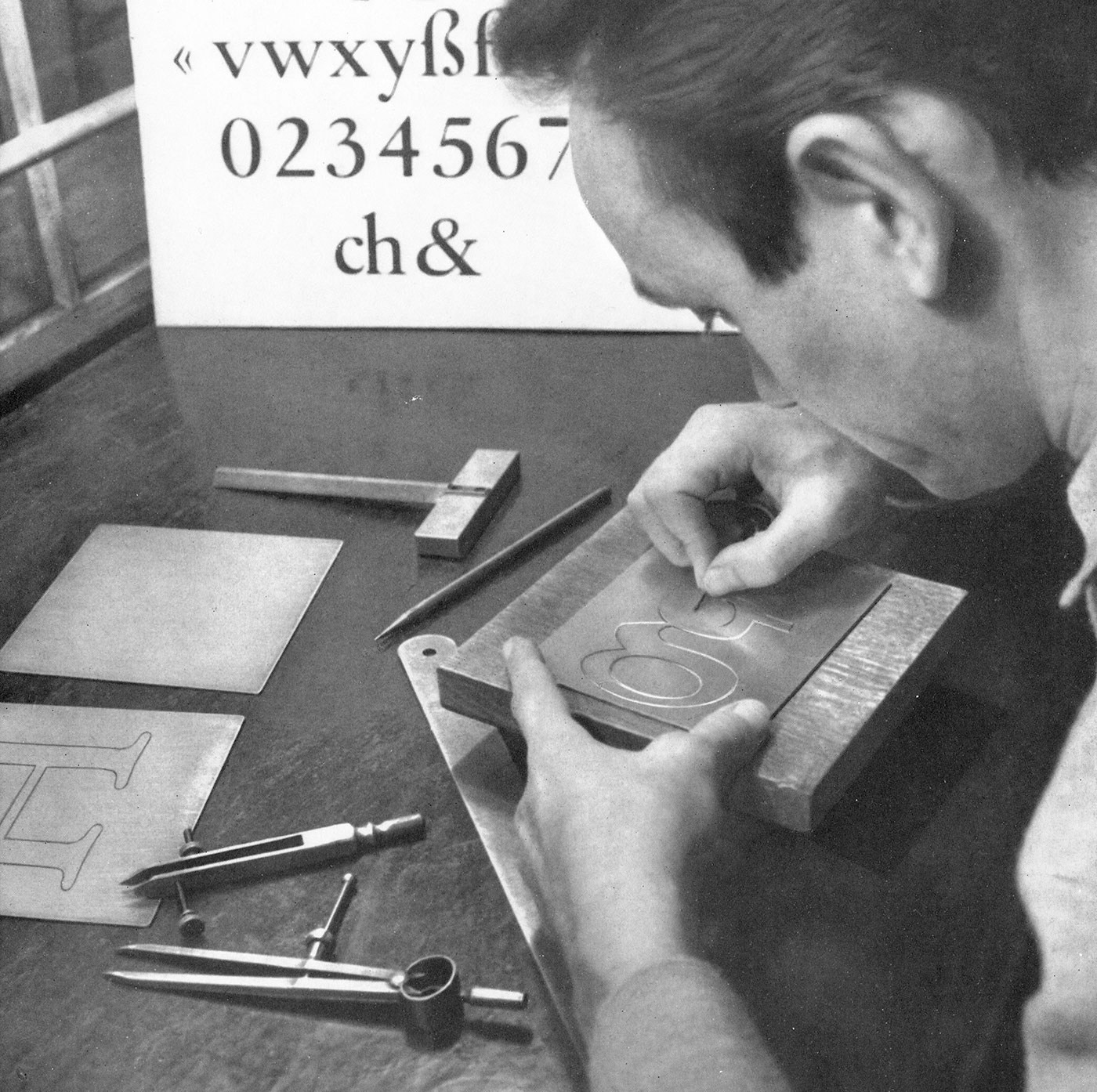
Engraver at work

Transferring the letter shape from the finished stencil

Making a punch

Punchcutter at work

Making matrices for type casting

Type casting machines

Close-up of a type casting machine at work

In-house printing with foundry type

In-house press

Making matrices for hot metal typesetting

Checking the matrices

Making phototypesetting fonts

Digital font production at the end of the 1980s

Photographic reproduction to test the design in smaller sizes
1. To begin with, please tell our readers a little bit about yourself and how you became interested in drawing letters.
I think the most interesting thing about me is that I grew up in a provincial town near the sea. I did spend my time sailing yachts, playing the violin and painting. When I was seventeen I left my lovely hometown and moved to Moscow. My passion was art and I was planning to become a book illustrator and designer because I love books and everything related to them. So I passed my exams and started studying at Moscow State University of Printing Arts. There I learned a lot about art and design history, illustration and book design. But for me the most important course was calligraphy and type design class led by Alexander Tarbeev. I fell in love with typography and type design. And I found the perfect teacher. Since then my ruling passion in life has been drawing letters. I practice calligraphy, draw letterings, logotypes and work on typefaces. My hobbies are music and art. I play the guitar, study singing and of course draw and paint when I have free time.

 
2. How many years did you practise calligraphy and lettering and what was your first lettering/calligraphy job?
I have been doing it for about eight years now. My first calligraphy attempts had to do with the beginning of Alexander Tarbeev’s class and it was nearly eight years ago. Since then I’ve been practising hard, but it was just for myself. I studied calligraphy, drawing non-commercial letterings and typefaces a lot. And honestly I don’t remember what was my first commercial lettering job. But my first released typeface was Voltaire script made in Artem Gorbunov’s design bureau. It was my first big commercial project and I was happy with the result.

 
3. If you had to pick one lettering/calligraphy job you are most proud of, which one would it be? Tell us a little bit how this project came about and what you liked about working on it.
That’s hard! I’m afraid I can’t choose one. And I’m not too proud of any of my works because they always could have been better. I’m a perfectionist so I struggle with that all the time. But I can choose one project that is very important for me despite being old and noncommercial: the posters for the Ukranian calligraphy and typography festival Rutenia. I was an unknown student and I was afraid of everything. But it was an amazing event and the task was both interesting and difficult, so it was a real challenge. I wanted to try my skills and it took me 3 days to make the posters. I mixed European calligraphy with old Cyrillic calligraphy traditions. I was proud of the result and I received a lot of appreciation from people I respect and admire very much. That was a perfect beginning and that encouraged me to work even harder.

 
4. What is your ideal creative environment? Where do you work? Studio space? Home office? Co-working?
I used to work at home. It’s difficult for me to focus on the work though when it’s noisy or you get disturbed in any other way. Sometimes I work in co-working spaces, but not so often.

 
5. Now let’s move on to your latest release. What was the inspiration, goal or idea behind the development of Jonesy? And what uses for it do you have in mind?
I love monoline connected signs. I love the way they look and I think they are perfect for street signs, logotypes and small typography too. I’ve seen many of them during my trips through Europe. But there are not so many typefaces in this fashion. And that’s understandable, because it’s rather complicated to create them.


If a typeface you work on is just a monoline without connections, that’s OK. If a typeface is connected but it’s not monoline, that’s OK as well. But if it’s monoline and connected at the same time, you are in trouble. You have to work on letterforms a lot to make them acceptable even a bit. Then you will realize that it’s absolutely not possible in some combinations and you have to create a lot of alternates and ligatures. In the case of Jonesy it’s been hundreds. Of course I talk about situations when you want your typeface to look as good as possible. So it was a challenge and I didn’t see similar typefaces on MyFonts or anywhere else. It was really interesting for me and I thought it might be useful for other designers who love this kind of typography and have no appropriate tool.


6. Which drawing tools and software tools did you use to design the typeface?
I always start working on a typeface with lettering or calligraphic sketches on paper. I use pencils, markers and a wide range of calligraphy tools.
Regarding the software: I used to work with Adobe products and Robofont (with associated programs). For lettering I use Illustrator and sometimes Robofont too. For typefaces I use Robofont, MetricsMachine and Superpolator.

 
7. Jonesy comes with hundreds of ligatures and alternative glyphs to give the font a more handwritten appearance. For a calligraphy job you have total artistic freedom writing words and phrases with the ability to react to context and meaning, while typefaces require any letter combination just to work all the time. Do you enjoy calligraphy more because of that and do you feel limited by this aspect while designing typefaces? Or has the OpenType technology removed this clear border between calligraphy and typesetting in your opinion?
Great question! Yes, I really enjoy calligraphy/lettering because I have complete freedom to write and draw as I please. But I enjoy the process of creating typeface even more, because it’s like a brainteaser. You have a lot of issues and limitations, but if you solve these problems you have a clever type system that works and looks well. Of course OpenType technology improves our lives as type designers a lot in that regard, but I’m sure typefaces will never be able to look like calligraphy or lettering. And I don’t think it’s bad because they serve different purposes.


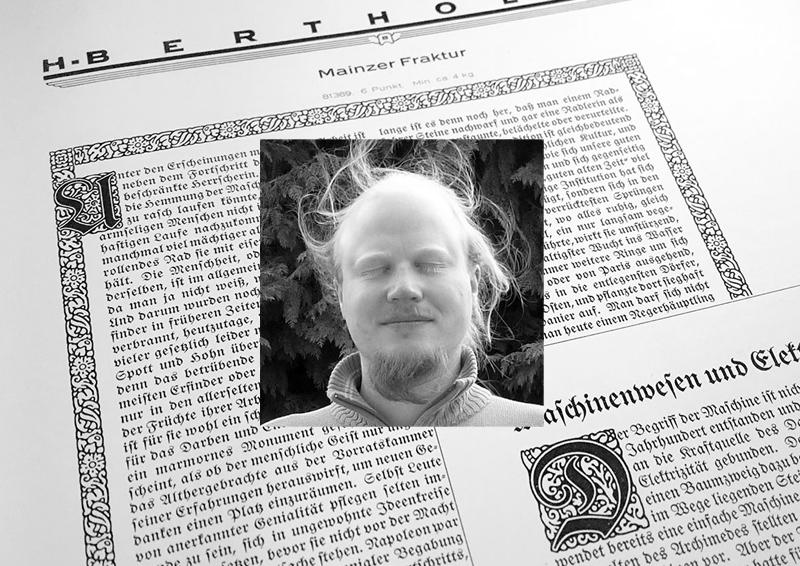
Gerrit Ansmann is a physicist from Germany, who worked on the freely available blackletter font Unifraktur Maguntia, which now has a large character set and makes extensive use of smart font technologies such as OpenType. In this interview he gives us some background information about this project. 

1. As a physicist, what fascinates you about typography and type design? And what was your motivation to create such a feature-rich blackletter font?
I always had an interest in computer graphics, which was intensified when it became useful for creating scientific illustrations and when Bézier curves, splines and similar were part of my elective numerics courses. Moreover, type design is an appealing art form to me due to its mathematical nature. But that’s not what actually lead me to working on blackletter fonts.
As a physicist, I naturally belong to the target audience of roleplaying games, and my roleplaying game of choice was Call of Cthulhu, whose main arena is our world in the 1920s and which features a lot of investigations. Thus people like me who want to create scenarios for this game often need to create fictive newspaper clippings and similar from that period and older. Being somewhat perfectionistic, I learnt a bit about blackletter typesetting and produced texts reproducing historical typesetting, in particular the long s and blackletter ligatures.
Unfortunately, most blackletter fonts that allowed for such an authentic typesetting did not support Unicode or OpenType, and so I had to find out where special characters were located for each font and manually insert them into the texts. Unifraktur Maguntia was an exception to this, but—like most blackletter fonts—was based on a dissatisfying digitalisation, e.g., words like Luftfahrt featured bars of f and t at three different heights, and the J and I were just scaled versions of each other. As the font was open, I began with fixing some prominent issues, discovered more issues, fixed them, decided to throw away everything and to re-digitialise the historic source, and so on. In the beginning, my motivation was that I could eventually create a brief guideline for historic blackletter typesetting, which would not require the user to use some esoterically placed special characters, but rely on OpenType features or similar.
Soon, another motivation arose: Almost all creators of blackletter fonts seemed to go for quantity rather than quality, and I wanted the world to have at least one good and free blackletter font that allowed to do everything that one could reasonably want to do with it.

2. On which historical sources is the font based? How much of it is kept close to the original(s) and how much was reinterpreted or created new?
The primary historical source is Mainzer Fraktur by Carl Albert Fahrenwaldt from 1901. It provides most letters (and ligatures) of the standard German alphabet, except J, Ä, Ö, and Ü, which were only beginning to emerge for blackletter typsetting when it was created. From the few remaining glyphs of the original typeface, I adapted a few and redesigned the others—in particular the numerals and some basic punctuation characters—as their style was roman and not blackletter. For reasons that still elude me, this was typical for historic blackletter fonts, which is why I later added numerals in the style of roman typefaces as an alternative.


All other elements were newly designed, based on the existing glyphs, if possible, and inspired by the original Maguntia and other blackletter typefaces. This redesign includes the modern variants, numerals, diacritical marks, and several special characters.

3. Legibility vs. Tradition: Is the font made for traditional and/or modern blackletter typesetting and how do you deal with the legibility problems of today’s readers regarding Fraktur fonts?
On the one hand, many glyphs and features only exist for the purpose of reproducing historical typesetting—allowing a user to render an equivalent to every fraktur text is one of the main goals I was striving at. On the other hand, I created modern variants of ten letters that are typically misread by readers unfamiliar with blackletter as well as a round s without a swash for use in the beginning or middle of a word, where historically a long s was used in most cases. However, when creating the modern variants, I tried to adhere to the design principles of the original typeface and therefore, for example, I did not create a modern T (as I could not come up with a satisfying design) and the modern N is still very far from a roman-type N. So the modern variants are a trade-off between readability and preserving the blackletter style, hopefully a good one.

A paragraph using the traditional and modernized glyph designs 
 
4. Traditionalists want to keep blackletter designs and their typesetting rules for German to stay the way they were in the first half of the 20th century, while others would argue that modernizations are a good way to keep the blackletter style alive. What is your opinion on modernized blackletter designs and typesetting rules?
I do not think that anybody should design or use a certain typeface just to keep some style alive. Use a typeface if it fits your needs; design one, if you enjoy the process or if you think that somebody else needs it—in which case it would be this need that would be actually keeping the style alive.
That being said, I think that both, modernised and traditional approaches, have their place: If you just want the typeface to say “traditional” or “German”, and readability is a valid concern, modernisations are fine; if you want the typeface to say “historical” or “old”, and you can trust your audience to decypher the text in a reasonable time, use the long s, the traditional letter forms, ligatures, and so on. However, I have no sympathy for pointlessly bizarre mixtures or failed attempts at being historical that could have been avoided with one minute of Internet research. The most common of these mistakes is plainly replacing every s with a long one, but there are also things like the new Warsteiner logo, whose t looks like a blackletter k, if anything, but neither like a blackletter nor a roman t.
5. Today, Fraktur fonts are rarely used for typesetting German and when they are, there is often an intentional or unintentional connotation with Nazi Germany. Is that something we can even overcome? What uses do you have in mind for Unifraktur Maguntia or how would you like to see it used?
In my experience, fraktur has its niches in Germany where it isn’t automatically associated with Nazis, for example in the contexts of tradition, history, or ceremony. Outside Germany, it can have similar niches, in particular in countries who used fraktur historically—e.g., I observed a considerable amount of fraktur in Prague. For the rest of the world, there are at least some people to whom fraktur just says “German” (which alone unfortunately makes for a Nazi connotation), but again the context and also the location is crucial. However, for other uses, I do not think we will or need to overcome a certain Nazi connotation—for instance, “historical” or “old” are not labels that one would normally see attached to one’s political views. Ironically and hopefully much to the Nazis’ dismay, one of the Maguntia’s features is a wide support of “international” characters and thus the capability of writing names of non-German origin in blackletter, e.g., for the needs of a German folklore society—I would really enjoy seeing the Maguntia being used to write the name of, say, a carnival princess of Turkish origin.

Also, many features and glyphs are not aimed at reproducing historical German typesetting but that of other languages such as Latvian, Czech, Slovak, and Sorbian. That being said, I did not focus on a single type of application, but rather hope that the Maguntia gives users the freedom to do what they want for their application—be it creating a menu for an Austrian restaurant in Portugal, a facsimile of some historic text, the Polish translation of Asterix and the Goths, or even a political cartoon.
6. Can you highlight some of the smartfont features of Unifraktur Maguntia?
The smartest feature is arguably the heuristics for the long s which uses the surrounding letters to decide whether an s is long or round and changes it accordingly. This isn’t perfect, but if you aren’t happy with the results, you can correct them with a zero-width non-joiner and still leave the majority of the work to the automatism. I should mention there are fonts out there that go further and implemented an entire dictionary (which are however not free and do not work in all applications). A similar automatism is implemented for the round r, a variant that can be found in very old typesetting.

We also separately implemented the two types of ligatures distinguished by historical blackletter typesetting—required and typographical ones—, which facilitates the implementation of letterspacing, which dissolved the latter type of ligatures but not the former. 
Mainly for modern typesetting, I implemented a feature that removes the—in my opinion disturbing—swashes from round s that do not occur at the end of the word.
The majority of the remaining features are not that smart, i.e., just simple substitutions, in particular the aforementioned modern forms, historic variants, and four kinds of numerals: blackletter and roman as well as proportional and monospace.
7. In which apps and situations will the font work? What are the requirements and where are the limits?
Little surprisingly, a program that fully supports OpenType with feature selection is the best and allows you to quickly tune the font to your needs. If you have OpenType, but cannot or do not want to select features, there are ready-to-use variants which correspond to the activation of certain feature sets and try to emulate German historic typesetting at a specific time or cater modern readers, respectively. If possible those features are hard-coded and thus work, if there is no OpenType support at all. As a last resort, all special characters can be accessed through Unicode’s Private Use Area.

On another note, if you go to small resolutions, you will notice that hinting technology isn’t really made for most blackletter typefaces. I put some effort in this direction, harmonising line widths, positions, and manually marking a lot of stems, but I am not willing to perform hinting on the bitmap level.
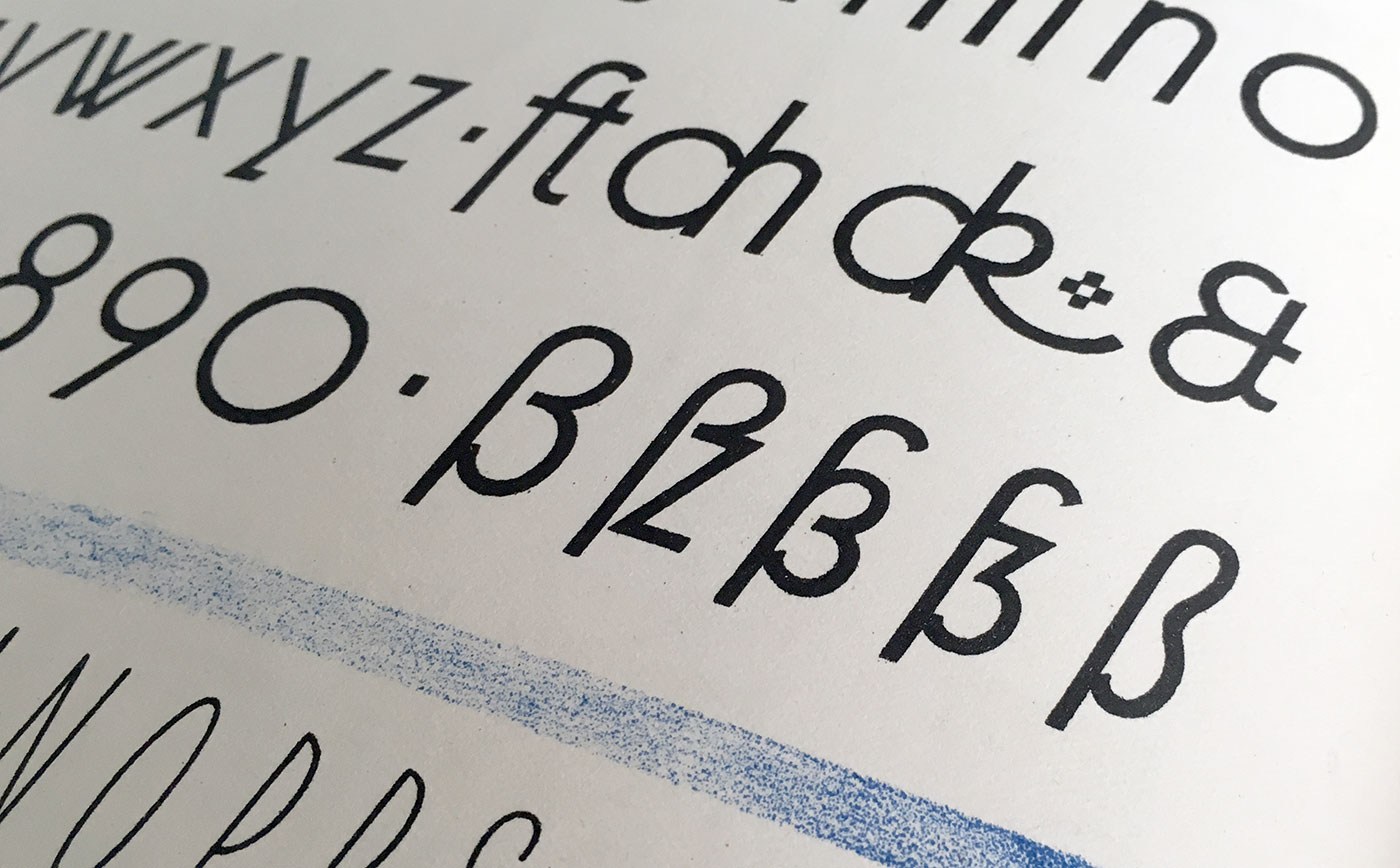
The sharp s (or “Eszett” as it is called in German) is a letter of the alphabet in Germany and Austria. The Unicode casing rules state: “The German es-zed is special”. Indeed it is! Its (still not fully explained) history is full of twists and today’s understanding of this history is often full of misunderstandings. The origins of this character won’t be the discussed in detail in this article. Instead I will focus on the stylistic options which have resulted from the recent history. 

Sharp s variations for an alphabet in a lettering/calligraphy book from the 1930s by Willy Schumann
Today there are two standard models for the design of the ß character. They are explained at first and are recommendable for most of today’s typefaces. 
1. The ſs Ligature Design
This design is both very old and rather new at the same time. It was used for centuries across Europe, especially in cursive writing, either as a purely stylistic choice or in accordance with a typesetting practice which avoided a long s as the end of words and therefore displayed a double s (ſſ) as ſs, either visually connected or not. 


ſs ligatures from Giovanbattista Palatino, from a 1578 compendium
Since this design in its connected form is so visually similar to the typical modern German ß, it is often mistaken as the actual origin of the German character. But using this design for German texts is a rather new practice, which only became typical since around the middle of the 20th century. At that time, the roman and italic type styles of the Latin script replaced blackletter and Kurrent for German texts and with that, the influence of blackletter on the design of German typefaces started to vanish. Typical German blackletter ligatures (such as ch, ck, tz) came out of use and the understanding of the ß character shifted slowly. In caps-only typesetting the ß would be set as SZ in the beginning of the 20th century, but later SS became more common and finally the only correct spelling—until the introduction of the capital sharp s. 
Without the influence of blackletter, a German alphabet in the roman type style was now again more clearly based on designs from the time of Classicism and Renaissance and the historic ſs ligature became a perfect fit for the German ß—both in its design and the understanding of the character. 
Using this ligature design is the typical choice for so-called humanistic typefaces, i.e. designs which have their roots in the traditional book typefaces of the Renaissance. Both serif and sans serif typefaces can use this design model of the sharp s character.  


The ſs ligature design in Optima and Syntax
Designing the ß in this style is rather simple, since it really is just ſ and s connected with an arc. The connection however is mandatory today. While an unconnected design is a historic variation, it won’t be accepted by today’s readers.
The upper counter area is ofter narrower than the lower counter area, as it can be seen in the examples above. But there are also typefaces with a more prominent upper counter area, especially in italic styles. 

The sharp s in Sabon
The arc and the s shape usually connect as one continuous curve, but there are a few typefaces which stress the different letter parts more clearly by making an abrupt change of direction. This can also work fine. But just to be clear: German readers without a background in typography see the ß as one character. Stressing ſ and s as individual parts of that design is neither expected nor necessarily helpful. Just as a W exposing its origin as ligature of two V is a possibility, but not necessarily helpful. 

The sharp s in Utopia and Calibri
The ſ in its upright version might have a horizontal stroke on the left side and the ß then gets this stroke as well. This is a traditional design feature, but not really required. In my opinion, it only supports the confusion of ſ and f and therefore the horizontal stroke might also be omitted for ſ and ß in modern typefaces. Either way, ſ and ß should always follow the same principles. 
And speaking of the long s: It will usually have a descender in the italic design, but not in the roman version. The same is true for the sharp s. 

Upright and cursive styles of Tierra Nueva. 
 
2. The Sulzbach Design
As already mentioned, German was mostly set in blackletter (or written in Kurrent) until the middle of the 20th century and the sharp s as German character was established and mandatory in these type and writing styles. When German was written or set in the roman type style, a counterpart for the blackletter ß wasn’t available for a long time. As a result we can find different alternative spellings until the end of the 19th century. For example: a word like “groß” (big) in blackletter could appear as gross, groſs or grosz in roman typefaces.

German book from 1795 in a roman typeface (Prillwitz Antiqua) using ſs where a blackletter text would always use ß.
Around 1900 an official German orthography was established and a committee of type founders and printers met to define rules regarding the design and use of German characters like ß, ö, ä, ü in upper and lower case. At that time, typesetting and writing German in the roman style had already gained popularity and there was a need to find solutions and regulations regarding the different practices used for blackletter and non-blackletter typesetting. Some differences were kept, some things were unified. The ſ character was kept for blackletter, but dropped for setting German in roman and italic typefaces. The ß on the other was understood as a character of its own, which had become so important, that it was decided to add it to all typefaces, not just blackletter ones as before. All German type foundries should add it to their roman and italic designs. The design proposal that was chosen had similarities with an unusual letter used in the 17th century by the printer Abraham Lichtenthaler in the city of Sulzbach and is therefore now known as “Sulzbacher Form” (Sulzbach design). 

Sharp s in the Sulzbach design added to Walbaum Antiqua in the 20th century. In the time of Justus Erich Walbaum such a roman typeface had no sharp s. 
The new design doesn’t include a clear s or z shape, but consists of a long s at the left side and two connected arcs on the right side. As a result, the letter often looks like an uppercase B to people not familiar with German. This design was applied to many German non-blackletter typefaces after 1903, including the traditional old-style and modern typefaces. It remains in use until today, but mostly for more geometric/constructed typefaces, where the simplicity of the two arcs works better than the flowing connection of the upper arc of the long s with a lowercase s.

Sharp s in Futura
The Sulzbach design can more easily use an upper counter area that is similar in size and as width as the lower counter area. A tear-shaped or ball-shaped terminal can be used for serif designs. The connection of the two arcs in the middle should reach to the left as far as necessary, to make the character legible, but not so far as to suggest a connection with the stem – after all, it is not a B. And of course the aperture at the bottom should not be closed. 

Sharp S with teardrop terminal in this version of Bodoni
The Sulzbach design is also the standard model for German handwriting. It will usually be written with a descender and fonts might replicate this. 

Sharp s in German in the historic Kurrent handwriting

Handwritten sharp s FF Schulschrift

The Schulbuch typeface is aimed at children learning to read and uses the descender of the handwritten sharp s.
The two models explained above should suffice to design a proper ß for almost all roman and italic typefaces, but there are more variations in existence. For the sake of completeness they are shown below. They should only be used where appropriate. An unusual design of the ß character can make a typeface unsuitable for setting German, especially when it is supposed to be used for copy texts. It’s often better to include uncommon/historic designs as stylistic alternates and put a standard ß in the default slot for this character (U+00DF).  

The beautiful sharp s in the metal version of Bernhard Schönschrift (1925)

The unusual sharp s in Ratio-Latein (1923)
Historic Variation: The “Blackletter ß”
With German blackletter and non-blackletter typefaces being used side by side since the end of the 19th century, type designers also started to mix elements of the two.

The sharp s in blackletter
Blackletter fonts became more simplified and the letter skeletons of the early blackletter fonts became more popular, which were still closer to the design of the roman letter style. And roman typefaces from German foundries started to “look more German” in the first half of the 20th century. The mandatory ligatures of blackletter typesetting were often added to the character set of the roman typefaces and the design of individual letters was also borrowed from blackletter typefaces. A typical case for that is the sharp s character. Many, but not all typefaces used the recommended Sulzbach design. A design as a ligature of a long s with something like a 3 with a flat top resembled the typical look of a blackletter ß and also became a popular choice until the middle of the 20th century.

The blackletter-inspired sharp s in Erbar

Meister-Kursiv by Herbert Thannhaeuser, 1952

Technotyp by Herbert Thannhaeuser, 1948

Not using a descender is also possible for this kind of sharp s
Because the “blackletter sharp s” in roman typefaces is typical for the first half of the 20th century, its use can still evoke a connection with that time. It appears—as default or stylistic alternative—in a few modern typefaces as well (e.g. FF Kava, Verlag, Metric, DIN Next Slab) and is legible within a word context, but it is not something that works for every font or use case. 
The examples shown above represent the most typical design of this “blackletter sharp s” approach. But as a variation, some typefaces also use a design that looks like a 3 with two arcs or a z design on the right side of the ligature. These designs might not work so well for today’s readers. 

The sharp s in Ehmcke Antiqua (1909), which is also in the digital versions named Carlton.

The URW++ version of Bodoni


While used occasionally in the 20th century—a literal Eszett (“sz”) ligature is not recommendable today.
 
Historic Variation: The Connected Script ſs Ligature
I already explained the ligature of a long s and a round s where the top part of the long s is used to make the connection to the round s. But in connected cursive writing there is also a way of writing a regular long s and then making a connection from the bottom, usually as extension of a descender loop in the long s.

This style can also be found across Europe and across different languages over several centuries. It usually just represents a double s, but in a German text that isn’t written with a long s as individual character, this design represents the sharp s, as seen in the following examples. 

From an original type specimen booklet of Justus Erich Walbaum from the early 19th century. “daß” and “bloß” are typeset as “daſs” and “bloſs”.

This design can be found in use until the 20th century, but it not common anymore and will probably confuse many of today’s readers of German. 

An undated German school poster shows the connected script ſs ligature as alternative to the regular ß in the Sulzbach design. 
1. To begin with, please tell us a little bit about yourself!
I was born in Romania, in a small town called Medgidia, about 50 km from the coast of the Black Sea. When I as 12, my family moved to Vienna, where I attended the American International School. I feel like I got the best of both Eastern and Western Europe, and I consider myself to be an “international.” When I was in high school, I wanted to be a lawyer (to be able to argue my point of view in front of a judge), an artist (I had always loved drawing and painting), or a psychologist (to analyze people’s thoughts and behaviors, then help them come to a solution). However, there did not seem to be a job that combined all of these … until I discovered graphic design. Practicing graphic design and working for clients is pretty much like being a creative psychologist lawyer. Later, while studying graphic design, I developed a love for typography, calligraphy, and type design. When I work on type design projects, it is more than art (I never liked creating for the sake of art), it is a system that is dictated by a series of rules, traditions, and historical implications. It gives just enough room for creativity while allowing me to do what I do best: analyze, test, and systematize.

2. How did you get to work with a type foundry from India, which has its roots in the developments of fonts with Indian scripts?
The Indian Type Foundry has been doing extremely well with Indian scripts, but they aim to become a global distributor of quality typefaces, so they have been expanding their font library with Latin script type families and more. They recently released their first Arabic type family.
Satya Rajpurohit, the co-founder of ITF, contacted me at the end of 2013, knowing that I had just graduated from Type and Media at KABK. He proposed that I design a slab serif family for ITF, which was something I never had designed before. I love a good challenge and, after some back and forth emailing, we agreed to create a bigger family including sans and slab, as well as italics, so that it could be used in all kinds of editorial projects, branding, and packaging. This was going to be one of the biggest ITF families so far and my most complex project yet. I couldn’t wait to start.

3. What was the idea or inspiration for Equitan? Is it based on historical typefaces?
Knowing I had to make a slab serif design, I did my research and was not very inspired with what I could find. There were flavorful slab serifs that were a bit old-school looking (Clarendon, Century Schoolbook), where the slabs seemed well integrated in the letter shapes; and there were modern designs (Museo, Neutraface), where the slabs were just sort of slapped onto existing sans serif letters, which made them seem a bit too static. I generally appreciate the approach of typefaces like Eames Century (designed by Erik van Blokland), Maple (designed by Eric Olson), where it seems as though the designers just created their own path, without being influenced by related designs, and it works! These designs are usable, yet full of life.

While browsing through the old specimen book of Palmer and Rey’s from 1844, the skeleton forms of their typefaces really spoke to me. They had some typefaces called Antique, some Clarendons, and some Gothics that looked very related with each other in their basic shapes and proportions. Without forming a family, they were obviously following the same logic. 
I was fascinated by the skeleton forms and general character of these Antiques, with very long serifs and closed apertures. Although the letters seemed clumsy for today’s standards—the shapes were overcorrected, and the caps were much to heavy— it seemed that these letters were hiding a secret elegance that I could possibly tap into by creating a modern family. So this is what I started doing.

4. How did you approach the development of so many styles from different sub-families? Which styles came first or were they developed all at the same time?
I started by shaping the slab serif, because this has the most personality so it would help me to define the family. My first attempts were quite literal replicas of the shapes I saw in the book from 1844, but slowly the design progressed into a family with its own merit. 
I knew that the sooner I introduce other weights and styles, the better I will be able to make decisions about the family as a whole. I see the whole type family as a system where members have to work with each other, support each other, and yet share the same DNA. That is why I start working on a few “strategic” weights from the early phases.
Within the first month, I gave the Sans a try, which would inform me if the skeleton shapes of the slab are transferable. Then I started the Slab Black weight, where I knew that I could pump up the personality even more. The Slab Thin weight would tell me whether the proportions of the letters were fitting well with each other and whether the skeleton shapes were interesting on their own, without contrast. With each development, the type family took shape. The masters for each of the sub-families were Thin, Regular, and Black.

When I added the italics, I felt like a machine, working on 12 masters at once. I bought a new 27 inch computer screen (I can recommend this conveniently priced monitor for any design work: Dell Ultrasharp U2715H), rotated the old 23 inch screen by 90° and placed it on the right hand-side. This helped divide my screen real-estate wisely and work more productively. I love this part of the process, when I am juggling dozens of numbers in my head, remembering decisions I made the day before, applying changes in all the masters at once. I had the privilege to be working on this almost full-time, so I could keep all the details fresh in mind. This helps a lot for being efficient! I ran many checks and tests, designed many editorial-like pages to see how the weights played together, how the numerals and other symbols fit in.
After 6 months of work, in August, I handed over the final files to the Indian Type Foundry. They were not yet kerned and the character sets were still rather small. In January of 2016, I was asked to add kerning and expand the character sets of the Equitan family. This was a great opportunity to see the typeface one last time, and I ended up making, once again, all kinds of small corrections. After this, we generated and tested all the interpolated weights.

5. What typical uses did you have in mind while designing the family? Is there a specific application you would love to see your typeface used in?
Equitan is a multi-purpose family, generally for use that requires typographic richness. The Thin and Black weights are great for headlines. The other weights offer the designer a lot of freedom for text use. 
Equitan would be great as the in-house type family for a larger company, because the Slab is very recognizable, yet the Sans can be a trusty replacement for Helvetica in office use. 
Secretly, I would love to see Equitan Slab be used on some meat packaging. The all-caps deliver such BBQ-awesomeness! But, honestly,  I would be excited if my typefaces are used in any way. That would mean I did my job right.

6. Which tools did you use and which challenges did you face while designing the type family?
Like most designers who grew up with a computer in front of their face, I designed most of this family on-screen (rather than sketching whole alphabets by hand). However, and this is very important to me, I checked every weight in print so many times, and optically adjusted what looked strange. The result is a typeface that is not entirely “perfect.” Some things are measured, others are judged by eye. If you look at the “o” shapes for a long time, you will notice that they are … potatoes. Not all circles are really circles. I think this is something that helped the typeface retain some of that dynamic quality that the original 1844 letters had.
I used RoboFont to design this family. I used MetricsMachine to kern it. I used Prepolator & Superpolator to make some test interpolations and extrapolations (The final interpolations were made in-house at ITF, and I don’t know what software they use). 
Inside RoboFont, I use a bunch of extensions that help make life easier when designing a family: 
Overlay UFO: shows an overlap of the same glyph in multiple weights. This helps you see if the details match in those weights, compare angles in italics, control if the heights of your ascender or oldstyle numerals are the same in all weights. Ramsay St: shows related characters left and right of the one you are currently designing. This helps you design in context, and you can even define the neighbors yourself. AdjustMetrics: makes sidebearing adjustments in batch Word-o-mat: generates very customizable strings of real words. This is great for testing words when your character set is not yet complete.  ScalingEditTool: also known as interpolated nudge, helps you make small changes to letters quicker by proportionally adjusting the length of the handles while you are moving a point or group of points. TestInstallAllOpen: test installs all open font files. I must have clicked this a thousand times. I use custom scripts for generating anchors and accented glyphs and making character set overviews. I design using InDesign and I use an HP LaserJet Pro 400 M401 to print tests, which gives a sharp print for a good value. I use either 80 or 90 gsm off-white paper for testing type, because the lower contrast of type-to-paper not only resembles real books, but is also a bit nicer for your eyes.

The beginning of the type design process is always the hardest part for me. I want to make something new and relevant, yet without copying previous work. The best advice I got about this was from someone who told me, “It is unique because YOU are making it for the first time.” That takes away part of the pressure; the second thing is to just keep working on it, shaping it until it becomes yours.
In my hope of making something very unique, I had added slabs even to the bottoms of capital V and W. These looked totally strange for a text type.  I knew the usual story would unfold: I would at some point realize that most of these details are irrelevant and I chopped everything off. Yet, like with most things that you fall in love with, you cannot just say “Goodbye.” You need to get angry, you need to be pushed into letting go! To speed up this process, I asked for feedback from a ruthless friend, whose opinion I respect very much; and she told me to my face what I already knew: that the shapes still looked very dated, that I was not supposed to be making a revival, and that I had to bring my own voice to the design. Bingo! I immediately fell out of love with the letters.  

Working so long on one project, it becomes personal. This can often be an issue because your emotions get in the way of progress. The fact that the timeline was rather short helped me not to get lost in iterations and details. My best advice here would be to work as if you are working on someone else's typeface. That way, you can keep rational about decisions and progress much faster. If you cannot do that, have a friend help you with an honest and critical opinion once a month.
Of course, there are also design challenges. Some shapes were harder to pull off and took days of tweaking and testing. It was difficult to design the Q, R and k in such a way that they stay interesting, legible in small sizes, and that their sans versions retain some queues from the quirky slab shapes.
Although this was my most complex project yet, it was not overwhelming to be working on so many styles at the same time. Because I was able to dedicate large chunks of time to this project, my short-term memory helped keep all the details together, and I was able to work effectively.

7. Are there plans to extend the typeface even further with more families or scripts? Or what other type projects will you work on next?
At the moment, I am not planning to extend Equitan. If ever, I would like to add an even fatter slab weight, for crazy display use; and maybe an impossibly thin version, the kind that Lucas de Groot would work on.
For now, I am working on my 10,000 hours (which apparently is the number of hours of practice you need to become a master at something). I have been commissioned to create another type family for ITF: a sharp, not-so-strictly geometric sans serif for text use. This is turning out to be a bit more challenging than I thought: striking the balance between quasi-geometry and text-appeal inside a multiple-weight family. 
This year, I want to finally finish up my Type and Media graduation typeface, Editura, which will be released with Bold Monday. This is a type family for “serious” publications, possibly with the phonetic alphabet and other goodies that linguists need included in it. 

By Thomas Bohm 
 
1. Introduction
Incorrect recognition of a letter or symbol can occur in a number of different situations, whether it be an unclear typeface, reading a book or at long distance reading a road sign, to more serious instances, like medicine information leaflets or on a display in an aircraft. Different people (general, children, dyslexic, visually impaired, ageing) also have specific letter and symbol issues and requirements. Which letters and symbols are the most problematic and how are letters and symbols to be designed for maximum recognition clarity?
The word ‘legible’ used in this paper refers to typefaces which have well defined easily recognisable letters and symbols, which can be decoded easily and quickly, which are not overly stylistic in letterform design, typically typefaces used in the context of continuous reading, not script typefaces.
 
2. Confusing letters and symbols for general people
We define general people as aged between 13–45 years old, who do not have dyslexia or visual impairments.
The following letters can be easily confused as other characters: lowercase l (el) can be read as the number 1 or a capital I (i). The capital I (i) can be read as a lowercase l (el) or as a number 1. The number 1 can be read as a lowercase l (el), capital I (i), or number 7 (Figure 1).
 

Figure 1. Typefaces: Bucko and Sassoon Infant.
 
Regarding the uppercase I (i), from research and testing Smuc et al. (2007) found that because of ‘a very high possibility for confusion with i, +, 1, t, l, it is advised to add serifs for distinction on top and base’.
In research and testing of a typeface (Tern) for road signage Smuc et al. (2007), found that ‘a bent terminal (at the bottom of the lowercase l (el)) was of great importance to distinction.’ Beier and Larson (2010) found that ‘a tail at the bottom of the lowercase l (el) letter, more specifically a broader one, improved legibility’.
Also Smuc et al. (2007) found that ‘a distinctive arm (at the top of the number 1) has a positive effect on discrimination, serifs at the lower end of stem do not seem to have an influence’. This is something I would question: that serifs at the bottom of the number 1 do not have an influence on recognition and clarity. In Chaparro et al. (2011), a number 1 with a distinctive arm at the top and a serif at the bottom scored 97% identification in testing with users, whereas a number 1 with only a distinct arm at the top and no serif at the bottom scored 43%; there is conflicting research in this area, for me the number 1 with an arm at the top and serif at the bottom defines the number 1 the most obviously (Figure 2).
 

Figure 2. Typefaces: Mandatory, Century Gothic, Adobe Garamond, Myriad, Monaco, Verdana, Knockout, Century Gothic, DIN, Sassoon Infant Alt, and Rockwell.
 

In a fast (extended reading) or long distance (car number plate) reading environment, the lowercase i could be read as a lowercase j (Scarrott, 1968). The capital B could be read as the number 8, and the capital D as a number 0 (zero), capital O (ow), or lowercase o (ow) (Nicholson, 2007). Other potentially confusing letters in some typefaces are the italic lowercase k (which could be confused as an italic capital R), the italic lowercase a (which could be confused as a lowercase o (ow), capital O (ow) or 0 (zero)), italic capital J (Spencer, 1969) (which could be confused as a lowercase f), the italic lowercase r (which could be an italic lowercase v or capital Y), the German Eszett (ß) (which could be confused as a capital B or number 8) and the lowercase g (Banjanin et al., 2013) (which could be a lowercase q) (Figure 3).
 

Figure 3. Typefaces, line 1: Century Gothic, Trebuchet, line 2: Mandatory, Helvetica Neue Condensed, Georgia, line 3: Mandatory, Helvetica Neue Condensed, line 4: Georgia, line 5: Bembo, line 6: Myriad, line 7 and 8: Baskerville, line 9: Century Gothic, Adobe Garamond, Mandatory, line 10: Courier.
 
Smuc et al. (2007) found that ‘the negative space between the stem and the dot (space between dot on i and main stroke) must be wide to allow for good distinction from characters as l, f, I, 1, [...]. The influence of a serif is to be explored in further testing’. In research and testing Beier and Larson (2010) found that ‘the hypothesis that serifs on the letter “i” improve legibility was confirmed for distance viewing. [...] it seems as if the slab serif on top of the stem helps to clarify the letterforms, although when placed at the bottom, the character becomes difficult to identify’. However, the last point, that the serif on the bottom of the i makes the character difficult to identify, is something I would question.
Regarding the lowercase j, research and testing (Smuc et al., 2007) found that ‘the tail is needed to be considerably bent and wide’. Beier and Larson (2010) support this: ‘The hypothesis that broad characters improve legibility was confirmed overall for the letter “j” (larger tail, broader descender)’.
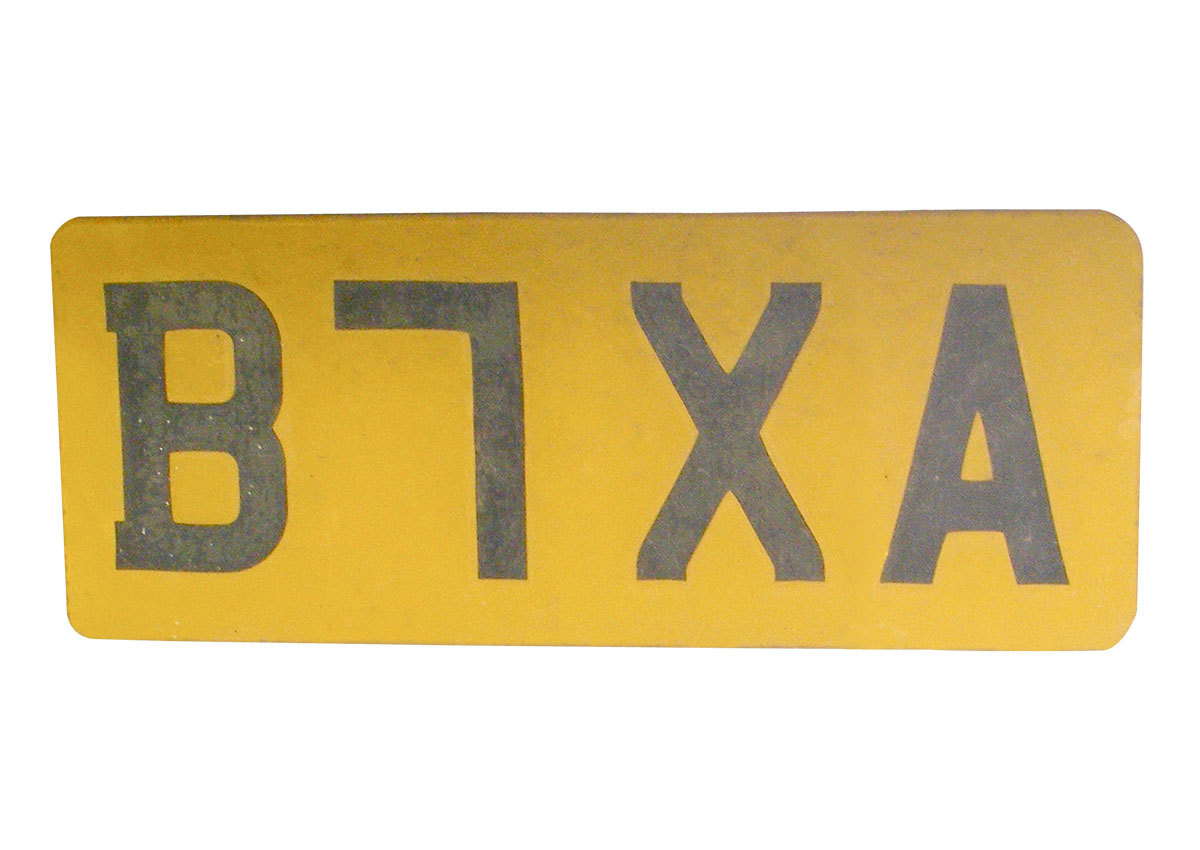
The United Kingdom car number plate in Figure 4 shows a letter which is not in a normal alphabet. What does it stand for? I have been unable to find out. From comments, Riccardo Sartori suggests it is a capital L rotated 180 degrees to form the letter/number which symbolises a number 7.
 

Figure 4. Letter on car number plate not in normal alphabet. Top typeface: English car number plate typeface ‘Mandatory’, bottom typeface: German car number plate typeface ‘FE-Schrift’.
 
Speech marks in typefaces like Verdana, Frutiger, Syntax (“ ” , ‘ ’) can be confused and look like prime marks (″ = inches, ′ = feet) or single and double dumb quotes (' , ") (Figure 5).
 

Figure 5. Real curly quotation marks, Verdana quotation marks, inch mark, feet mark, single and double dumb quote.
 
There are also three types of fraction marks (see image below). The third example could be read as a division sign. Whereas the second example uses a diagonal line which implies that the number above and below is a chunk, fraction of the numbers, a horizontal line has connections with division, dividing the number above and below, this is also supported by design of the division sign (÷) (Figure 6).
 

Figure 6. Fraction sign 1, 2 and 3.
 
Midpoints (·) should not be used as decimal points (.). I have seen midpoints used as decimal points in real life contexts: GCSE educational textbooks (Burndred, 1997) (Figure 7).
 

Figure 7. Midpoints and decimal points.
 
Why are commas used as decimal points when a decimal point is specific to numerical use? You would never write 2,5 mm, but you would write 2.5 mm. You would more often see 2 thousand 500 sheets written like so: 2,500 sheets, but rarely and maybe more correctly like so: 2.500 sheets. Commas should not be used as decimal points, as frequently seen in newspapers, because a comma marks a pause in text and is not specific to numbers. However, there are two co-existing conventions worldwide. One uses decimal points, the other uses decimal commas. More countries are subscribing to decimal commas than to decimal points. A decimal comma or decimal point can also be used to separate thousands, for example: English style: 967,295.00 (nine hundred and sixty seven thousand two hundred and ninety five pounds and zero pence), German style: 967.295,000 notice how the English and German styles are reversed. We can also note that in time values, a colon is used to separate hours, minutes and seconds. Note: if you use a space in numbers, it can split the numbers up, making them look like two different numbers. Figure 8.
 

Figure 8. Comma, decimal, and space points for numerical data (line 1). Thousands separator (lines 2 and 3), and colon for time data (line 4).
 
Roman numerals I, II, III, IV, V, VI, VII, VIII, IX, X (1–10) are a frequent source of confusion. Few people know their meaning. One should avoid using them. Also, a multiplication sign, an italic uppercase I (i), vertical line used as a separator used incorrectly, and the letter combination TT can also be misrecognized as a mathematical pi symbol. Figure 9.
 

Figure 9. Multiplication sign (line 1), italic uppercase I (i) vertical line and italic uppercase I (i) set in Century Gothic then Verdana (line 2), vertical line set in Helvetica (line 3), and TT and pi symbol (line 4).
 
‘Tightly spaced sans serif typefaces (Century Gothic, Helvetica) are more prone to confusion, because they do not have serifs which add definition to characters’ (Hudson, 2009).
Other confusing letter combinations are cl, which can be read as a lowercase d; rn, which can be read as a lowercase m; vv, which can be read as a lowercase w (Albert-Jan Pool, 2009); lowercase o (ow), capital O (ow), and 0 (zero), which can be read as each other. In OpenType typefaces, a defined (slashed or dotted) zero can be built into the typeface and selected from the typeface/software using the slashed zero option. The capital S could be read as 5, Z could be read as 2, LJ (capital el and jay) could be read as an uppercase U (as is noticeable in the professional dart player’s name MENSUR SULJOVIĆ). There is also the case of possibly needing to clarify the numbers 6 and 9 by adding an underline to them to mark where the baseline of the number is, in order to tell what number it is and if it has been turned around, like you see when lottery balls are being extracted from a tumbler on TV or on pool balls. There is also the case that a helicopter could need to identify the number on the top of a car’s roof on an official vehicle or ambulance. ce (when tracked/letterspaced tightly) can be seen as a œ (diphthong). Dmytro Perepølkin a data scientist from Norway contacted me via email in 2018. He raised an interesting issue regarding letter and symbol misrecognition used for phishing and spoofing purposes. Phishing is creating a fake lookalike page of a specific page. Spoofing can be defined as duplicating a domain name/phone number/email address/IP and using it for wrong purposes. See Figure 10 for an example of what he was suggesting. Even though characters in domain names between the www. and .extension are closely standardized, it is still a possibility that problems from letter and symbol misrecognition in domain names and URLs could be used for illegal purposes. Figure 10 and 11.
 

Figure 10. Easily misrecognised letter combinations for general people. Typefaces: Century Gothic, Cambria and Myriad.
 

Figure 11. Typefaces: Trebuchet, Monaco, Andale Mono and FE-Schrift.
 
Situations in which the previously described letters and symbols could get misrecognised are as follows:
III or Ill: Academic book. Number 1 or 7: Medicine information leaflet, road signage, financial data. i or j, B or 8, D, O or 0: Text (book), long distance (car number plate). Apostrophe/speech marks: Text, mathematical work. Fraction sign: Academic/educational textbook. Decimal point (.)/midpoint (·): Academic/educational textbook. Decimal point (. or ,): No major confusion, but possibly in financial data, a newspaper or academic text. Multiplication sign: Academic/educational textbook. Letter combinations: Text or signage. Number 0 (zero), lowercase o (ow), capital O (ow): username and passwords for online accounts, international zip/postal codes (Chaparro, et al., 2006), aircraft monitors (BBC News, 2002), credit card number or speed cameras.  
3. Confusing letters and symbols in condensed typefaces and superscripts/subscripts
Some condensed weight typefaces work and read as good as regular weight typefaces. However, in highly legible condensed typefaces, the condensed nature and form of letters does not give the letters the normal horizontal width they need, which creates specific problems, especially when they are used either very small, less than an x-height of 1.5mm (around 8pt) or less, or at long distance on signage or car number plates. Also if you look at the default superscript and subscript for the number 1 in a typeface like Calibre, unfortunately the typeface does not offer an alternate design to the default number 1 used specifically for superscripts or subscripts. The default number 1 style for superscripts and subscripts has an arm on the top, but no stroke on the bottom. You cannot input the default number 1 style used for the number 1 in general body text (which does by default have an arm at the top and stroke on the bottom of the number 1). The result of this is that, the number 1 in the superscript or subscript without a stroke on the bottom, could be seen as a small number 7. Why might the typeface designer have not provided an alternative number 1 style for superscripts and subscripts in Calibre? Maybe the typeface designer feels a stroke on the bottom, at the typically small size superscripts and subscripts are, would hamper legibility. What do non expert typographic people think of this, is it unclear or does it create confusion for general readers and the public? (Figure 12).
 

Figure 12. Examples showing condensed weight issues, and the superscript and subscript number 1 designs in the typeface: Calibri. The number 1 design for superscripts and subscripts is unchangeable and does not match the default number 1 design. Typefaces: Helvetica Neue Condensed, Silom and Calibre.
 
4. Confusing letters and symbols for children
We define children as aged between 4–12 years old.

Figure 13. Population of people who are children.
 
Infant characters, a, g, l, q, y, I, J, 1, 4, 7, 9, are characters specifically designed for people around 6 years old. In research and testing (Walker, 2005), ‘a possible reason for using infant characters is to make the characters more like handwritten forms’. Infant characters are what a child aged around 6 years old would write (by hand) and would be taught to write; subsequently, infant characters might more clearly reflect what they do and are taught. When children are a few years older and have learned to read and write fairly confidently, there is less need to use infant characters as a clarification. However, in the results from testing (Walker, 2005), infant characters did ‘not affect their reading performance in our tests’ and the children were able to point out ‘[an infant a] is what we write, [a normal a] is what we read’.
In research and testing (likely to be adult people), Beier and Larson (2010) found that ‘the infant a resulted in bad performance and misreadings’. Although as Sassoon (2001) points out, ‘recognition is a dominant factor when learning to read; the fact that the one-storey (infant) a, references to the letter shape that most children learn to write, has a positive influence on the inexperienced reader’. What can be noted is that the tail (stroke to the bottom right of the character of the infant a) in the typeface Sassoon Infant is far greater and defined than the infant a in a typeface like Century Gothic and many others.
Infant a’s are also used in italic and cursive typefaces; they present the same misrecognition problems as normal infant a’s.
In contemporary advertising/graphic communication typography in the United Kingdom, the infant a character is increasingly becoming popular (Age UK, Churchill Insurance, Facebook, Mastercard, Royal National Institute for the Blind, Vodafone, Waitrose, Waterstones, Yellow Pages), although the obvious problem is that it looks very similar to the lowercase o (ow) or a (0) zero or an uppercase O (ow) or even a lowercase sans serif Greek Alpha letter in an academic context [serif lowercase Greek Alpha letters seem to be in general more defined/distinguished than sans serif versions], a similarity which is increased further in a continuous reading context, [what is Mostercord?]. This increase in the popularity of the infant a is a typeface design fashion around the year 2011 (Figure 14 and 15).
 

Figure 14. Infant a’s in contemporary logo designs.
 

Figure 15. Infant a, lowercase o (ow), 0 (zero), captial O (ow) italic a, and lowercase Greek Alpha letter (sans serif), and lowercase Greek Alpha letter (serif, in brackets). Typefaces: Century Gothic, Georgia Italic, Myriad and Georgia.
 
Characteristics of infant characters are a: single story, g: single descender without loop, l: tail at bottom, q: diagonal line on descender, y: more curved descender, I: stroke on top and bottom, J: stroke on top, 1: diagonal stroke on top, 4: unjoined top, 7: crossbar on stroke, and 9: straight stem (Figure 16).
 

Figure 16. Top: Infant characters, bottom: normal characters. Typefaces: Above: Sassoon Infant, Below: Helvetica Neue, Trebuchet, Mandatory.
 
5. Confusing letters and symbols for people with dyslexia

Figure 17. Population of people with dyslexia.
 
Dyslexia is a neurologically-based, often familial disorder which interferes with the acquisition and processing of language. Varying in degrees of severity, it is manifested by difficulties in receptive and expressive language, including phonological processing, in reading, writing, spelling, handwriting, and sometimes arithmetic (Bright Solutions for Dyslexia, 2010). However, ‘the condition covers as many difficulties with the spoken and written word as it does definitions’ (Hillier, 2006).
From research and user testing (Hillier, 2006), ‘dyslexic users encounter identification problems with the following characters: lowercase l, numerical 1, exclamation mark !, lowercase o; uppercase O, p q, b d, j g, m n, m w, g h t, J L, L I. Character confusion difficulties are experienced with the following characters: b/d, p/q, a/e, b/k, u/v and the numerals. All of these difficulties are related to the similarity in design of the character forms, resulting (in the examples of b/d, p/q and 6/9) in letter reversals. Vowel letters (in the example of a/e) may also be a factor in dyslexic character confusion’.
Hillier (2006) from research and testing found that people with dyslexia prefer the following:
Handwritten style letters. Uppercase (Sylexiad) forms rather than lowercase forms. Long ascenders and descenders. [Height of the letters which go above and below, for instance, a lowercase x]. Distinctive and well-defined letters. [Not typefaces such as Arial, Century Gothic, Futura, Helvetica, which have very similar, undefined, geometric rounded forms]. Uniform stroke widths. [Not a typeface such as Times New Roman, which has varying stroke widths]. Perpendicular design. [At an angle of 90° to a line or surface, upright, vertical]. Familiarity of form. Sylexiad Serif (as a typeface family) (Figure 18).  

Figure 18. Robert Hillier, typeface: Sylexiad Serif Medium Regular and Italic weights (sans serif version also available).
 
In 2008, Christian Boer (Boer, 2008) designed a typeface called Dyslexie to increase the accuracy and readability of texts for dyslexics so that the errors by switching letters are reduced. Renske de Leeuw (de Leeuw, 2010) researched and tested the typeface. They found that Dyslexie resulted in fewer reading errors, although mainly in the specific area of dyslexics switching, flipping, mirroring and turning letters, such as the p and d (de Leeuw, 2010). Their main implemented design features considered to be of benefit to dyslexic readers are:
Keeping the focus on the letters at the bottom. Enlarging the openings (counters) of the letters. Making some letters a bit italic. Defining characters which look quite similar. Making the sticks (ascenders and descenders) of some letters longer. Making the capitals and the punctuation bold at the beginning and the end of the sentence. Making similar looking letters different heights, each with its own features. Using wider letterspacing than is normal (Figure 19).  

Figure 19. Christian Boer, typeface: Dyslexie Regular and Italic.
 
6. Confusing letters and symbols for people with visual impairments

Figure 20. Population of people with visual impairments.
 
The 2 million people with a sight problem in the United Kingdom have varying degrees of sight loss, ranging from those who have no light perception at all (total blindness), to those who have a sight loss which is uncorrectable by aids such as glasses and who have difficulty reading small print as well as text at a distance.
The many different eye conditions affect people in different ways. Three common eye conditions are glaucoma, diabetic retinopathy, and macular degeneration (Figure 21). Glaucoma can result in tunnel vision, where all side vision is lost and only central vision remains. Diabetic retinopathy can cause blurred and patchy vision. Macular degeneration can lead to a loss of central vision while side vision remains. But everyone is affected in different ways, and it is important not to assume that you know what someone can see simply because you know which eye condition she/he has (RNIB, 2006). The vast majority of people with sight problems are aged 65 and over (Tiresias, 2009). Another common term which gets used also within the area of visual impairments is low vision, low vision is defined as visual impairments that are not correctable through surgery, pharmaceuticals, glasses or contact lenses (The Vision Council, 2015).
 

Figure 21. Three common eye conditions. Photo credit: Action for Blind People.
 
People with visual impairments are likely, due to similarity of form, to find the following letters hard to recognise and confusing due to lack of visual clarity. The number 1, capital I (i) or lowercase l (el) or exclamation mark; the capital U or capital V; the lowercase u or v; number 5 or capital S; capital B and number 8; lowercase (infant) a or lowercase o (ow) or number 0 (zero) or uppercase O (ow); capital D or number 0 (zero) or uppercase O (ow) or lowercase o (ow); lowercase i and j; cl or d; rn or m; vv or w; capital Z or number 2; capital C or G; capital Q or uppercase O (ow); capital I S and O (ow) or number 150; word go or number 90 (using oldstyle figures). The letter combinations: LJ (capital el and lowercase jay), IJ (capital i and jay) LI (capital el and i) Ll (capital el and lowercase el) L1 (capital el and number 1) could be seen as an uppercase U. The letter combinations: LU (capital el and u), LLI (capital el el and i), LILI (capital el i el and i), and UU (capital u) could be seen as an uppercase W [other problematic characters which could be substituted into this previous series are the lowercase l (el) and number 1]. The following letter combinations: LU, LLI, UU could be read as an uppercase W, and LILI as UU [other problematic characters which could be substituted into this previous series are the lowercase l (el) and number 1]. The letter combinations: CI (capital c and i) can be seen as an uppercase O (ow) or number 0 (zero) [other problematic characters which could be substituted into this previous series are the lowercase l (el) and number 1]. There are also issues to do with letter design and punctuation/symbol combinations: <J (less than symbol with an uppercase jay) can combine to look like a <l (lowercase el) or <I (uppercase i). A lowercase or uppercase j to the right of a starting bracket/parentheses: (J (j could possibly look like an uppercase U, Peter Glaab (Glaab, 2017) has mentioned that a small white space character or extra kerning is manually necessary. Another similar problematic letter combination is: (T (which can look like a uppercase N). Figure 22.
 

Figure 22. Easily misrecognised letter combinations for people with visual impairments [and people with ageing eyesight, see heading number 7 later on in this paper]. Typefaces: Century Gothic, Myriad. Line 20 (last): Calibri, Lucida Sans, Avenir.
 
A recent example of one of the previous issues becoming a real-life problem was from an article by Ewout van Lambalgen (van Lambalgen, 2017). Ewout and a friend of his (both did not even have any visual impairments) booked their flight and then tried to check-in for their flight via an app on their mobile phone. The app kept on giving errors without being specific about what was going wrong. He then moved from a mobile app to a website, where he got an error message telling him that he apparently entered his friend’s passport document number incorrectly. The issue was all down to bad typography. The passport number was written like so: S35P7EC8 using capital letters and oldstyle figures. Because she was not paying enough attention and does not have a lot of knowledge about typography, she did not notice that the B in her document number (she misrecognised the last number eight as a capital B) was actually an 8 (number eight) due to the number eight aligning/sitting on the baseline and not dropping below the baseline (Figure 22.2).
 

Figure 22.2. Typeface: Calibri.
 
Additional guidelines (Perera, 2001) regarding letter design for people with visual impairments are as follows:
Anything in italics is very difficult for partially sighted people to read. Sans serif or bracketed serif was preferred over serif. It appears that a slight degree of serif which accentuates the characters ends without distracting from the simple form actually increased legibility. Normal or enlarged spacing. [This refers to spaces between characters (tracking/letterspacing)]. Darkest weight/bold letters. Punctuation marks should be made bigger, but not to the point where they distract from the content (Figure 23).  

Figure 23. Tiresias LPfont: Regular and Italic weights (Perera, 2001). Illustration (right) slight degree of serif on characters in LPfont (LPfont stands for Large Print font).
 
7. Confusing letters and symbols for people who are ageing
Ageing people are aged 45+ years old and may have started to develop impaired vision.
 

Figure 24. Population of people who are ageing.
 
The population of the UK is ageing, the percentage of the population aged 65 and over increased from 15% in 1984 to 16% in 2009, an increase of 1.7 million people. This trend is projected to continue. By 2034, 23% of the UK population is projected to be aged 65 and over (Office for National Statistics, 2010). 28% of the world’s population between the years of 2000–2025 will be aged 45 and older (World Health Organisation, 2001).
Brad Pettengill outlines 3 common conditions of ageing eyesight (Pettengill, 2014):
Loss of light: advancing age causes the pupils to shrink, less light enters the eye, causing vision problems in low-light environments. Inability to focus: the eye’s lens loses elasticity, becomes less able to focus while reading. Vision field loss: age-related eye diseases include macular degeneration, glaucoma, cataracts and diabetic retinopathy. Due to lack of visual clarity (blurred, dark), which can also be known as presbyopia (Funcke, 2002), people who are ageing are likely to experience problems with the same letters and symbols described under heading: 6. Confusing letters and symbols for people with visual impairments mentioned earlier in this paper. Additional guidelines (Nini, 2006) are as follows:
Consistent stroke widths [not typefaces like Bodoni or Times New Roman]. Open counter forms. Pronounced ascenders and descenders. Wider horizontal proportions. More distinct forms for each character (such as tails on the lowercase letters ‘t’ and ‘j’). Extended horizontal strokes for certain letterforms (such as the arm of the lowercase letter ‘r’ or the crossbar of the lowercase letter ‘t’).  
8. How do we and should we test typefaces?
We can research and theorise all we like, but a good evaluation is surely by finding out if our intentions are experienced by people, and even to learn about new problems and what is or is not working. What can we test in regard to a typeface? Alex Poole (Poole, 2012) suggests these measures of legibility or readability:
Speed of reading. Speed of perception. Fatigue in reading. Backtracking and other eye movements. Perceptibility at a distance. Perceptibility in peripheral vision. Other measures to add to the mix could be:
Personal preference. Ideal and best maximum optimized performance for a certain user type and use task. Appeal. Recall: quality of comprehension understanding of the text. Motivation. Read aloud/back. Quality of rendering on screen and hinting issues (technical). I am sure the lists above do not list all possibilities. It is worth noting that some of these testing options will get you weak information (like personal preference) and some will get you stronger information. Ruth Shrensky and David Sless (Shrensky & Sless, 2007) mention the following in regard to testing: ‘[...] The first is that inexperienced, untrained, or misguided information designers ask the wrong questions: What do people think of my designs? Which of my designs do they prefer? What must my artifact look like? What information must my artifact contain? The second reason is that asking the wrong questions about the design leads inevitably to certain ways of asking questions – methods of testing which give inadequate answers. [...]’. David Sless also raises the problems with: attitude and opinion surveys, preference tests, expert opinion and content-based design. ‘[...] A far more useful question to ask before you design a new information artifact or redesign an existing one is, what do I want people to be able to do with this artifact? [...]’. So we can observe that not all data or information gained is necessarily useful.
Ralf Herrmann mentions (Herrmann, 2011) in regard to testing typefaces generally: ‘Doing scientific studies to test which typefaces work best in this regard is almost impossible to do. For a proper test setup you would need to modify one parameter while keeping every other parameter unchanged. But setting a letter or word in different typefaces can not be considered as ‘changing one parameter’, because a typeface consists of dozens of relevant parameters like x-height, weight, contrast, width – just to name a few. So scientific test for typeface legibility are often full of flaws. Very often the typefaces are set at the same point size, but as every graphic designer should know, the point size does not reflect the actual size of the letters in print or on screen. So if you come across a scientific legibility study that compares typefaces set at the same point size, don’t even bother to read on!’.
 
9. Concluding observations
For general people, quite a few letters and symbols in highly legible typefaces are usually not defined enough, resulting in letter or symbol misrecognition, word confusion, and possibly fatal incidents. The context the letter/s or symbol/s is in, is also important, if the confusing letter or symbol is within a word you can probably work out what it is by looking at the whole word, if the confusing letter or symbol is isolated, on its own or within a password, it can be difficult to tell what it is. I came across quite a bit of research stating that, for instance, the lowercase y could be confused with the lowercase z (Grissinger, 2017) and the capital H and N could be confused with each other (Russell-Minda et al., 2007) and so on, which I was not convinced about. I cannot see how, if using a highly legible typeface for these characters, that they would ever get confused, so this information was not discussed further in this paper. I have noticed in 2019 that a version of Neue Frutiger called Neue Frutiger 1450 was released by Linotype in 2013 which tries to adhere and tackle issues raised in this paper and conform to DIN (Deutsches Institut für Normung) legibility standard 1450:2013-04 (DIN, 2013) which I have been unable to read because it is not in a language I am fluent in. It seems to make good commercial sense, as Frutiger is used a lot for signage and signs in airports. There is also the very real and present issue of webfonts, we have come to the point where basically any typeface designed recently or that is available in a digital format will most likely be use and can be used as a webfont. If a typeface is used as a webfont, the requirements and uses of the webfont, in regards to the information it will be required to handle, is strictly unpredictable and diverse. Finally, I noticed this billboard for a local historic attraction, see Figure 25, notice what they have done at the bottom of the billboard in the website address (all the typography for the billboard is capital letters), the website address should have been written like this: WWW.KRIII.COM but was written like this: WWW.KRiii.COM, I think this just reinforces that there is a genuine problem in this area in regard to typeface design.
 

Figure 25. An interesting issue is highlighted in the website address at the bottom of the billboard.
 
For children, the infant a is the most problematic character. It is easily misrecognised and, for some reason, has always been considered beneficial. This is not the case though. Research and testing reviewed in this paper has shown that even adults misrecognise the infant a. If the infant a character is used for children around 6 years old, it should be much better defined (like in the Sassoon Infant typeface) and used with caution. The infant a should not be used for competent, teenage, or adult readers. Where does this variation of standard recognizable letter shapes end? Also, infant a’s commonly used in italic or cursive typefaces should be well defined or distinct, or one should use a slanted form of the regular upright lowercase a. Is a reason for the rise in infant a’s because typefaces designers and designers want the text and typography to feel more friendly and informal? Do people even notice this change? It is worth noting that children today more readily encounter a wide range and vast variety of different letter designs, whether it be in the environment, on TV, using a computer, or through mobile devices. They encounter much more varied letterforms than in previous years.
Reviewed research has shown that people with dyslexia, in terms of the amount of problems, are the most problematic user group. Highly defined letters and symbols are desirable, to minimize misrecognition, misreading and mirroring of letters, symbols, and words. There are also other issues not specifically in regard to letter and symbol misrecognition which people with dyslexia experience such as: a wash-out effect, a river effect and a swirl effect (Irlen, 1991). All these effects cause the text to blur and jump, which results in visual confusion for the dyslexic reader (Evans, 2004). If you look in books or on the internet you can find examples of what it is like for people with dyslexia who experience these issues. Do specifically designed typefaces for people with dyslexia actually work?, one study by Chuck Bigelow (Bigelow, 2014) concludes that after surveying more than fifty scientific papers and books about dyslexia, he found no evidence that special dyslexia fonts confer statistically significant improvements in reading speed compared to standard, run-of-the-mill fonts. There seems to be conflicting views in this area, some say specific dyslexic typefaces make a difference and some say not. There seems to be conflicting views in this area, some say specific dyslexic typefaces make a difference and some say not, some have positive testing results, some not. Unfortunately there is an increasing amount of fonts/typefaces claimed to be designed specifically for people with dyslexia which are not convincing and do not supply any or an insufficient amount of: research references, problems faced or tried to tackle, and no information about testing procedures or results with people who have dyslexia. Dyslexic typefaces not included in this paper are: OpenDyslexic, EasyReading, Read Regular, Riona Moore’s dyslexia typeface and DysLex (which seems to be a similar typeface to Dyslexie). As of 2019, some new typefaces have appeared which tackle issues of vision impairment and dyslexia: Lexie Readable and Andika. These typefaces claim they tackle issues, but offer no research, original research or references to support the design or claims, and offer no feedback or testing information with people, this is a bit disappointing.
For people with visual impairments, lack of visual clarity means that letters and symbols of similar form need to be well defined. More research and testing is needed into the problems people with visual impairments encounter when reading text.
For people who are ageing, a blurry and dark vision means that letters and symbols of similar form need to be well defined. More research and testing is needed into the problems people who are ageing encounter when reading text.
For graphic communication/information designers, interesting typeface examples in relation to this research are as follows: Avance, Copperplate Gothic, Info Display, Lola, OCR-A, Rockwell, Unit and Zine Slab.
For typeface designers, implementing the research and guidelines into typeface designs can be seen as part of the creative challenge of designing a typeface and it is not an intention to make your job any harder. With the invention of OpenType, alternate letters and symbols to a defined version of the typeface can be built into and selected through the typeface/software using ‘stylistic sets’ option.
Regarding testing of typefaces with people, we need to better setup and compare typeface material when testing, and also get better (stronger) information/data when testing with people. Sofie Beier (Beier, 2016) touches upon the different issues and constraints designers and academics have faced in the past ‘To produce findings that are relevant for the practicing designer, scientists benefit from consulting designers in the development of the experiments. While designers can contribute with design skills, they cannot always contribute with scientific rigor. Hence, researchers will profit from adopting a methodological approach that ensures both control of critical typographical variables and scientific validation. An interdisciplinary collaboration where scientists provide valid test methods and analysis and designers identify relevant research questions and develop test materials, will enable a project to reach more informed findings than what the two fields would be able to produce in isolation’. To recap, designers have tended to, in the past, produce information lacking scientific rigour. Scientists produce information which is hard to understand, contains equations and lacks practical application.
In regard to all our user groups in this paper, Ralf Herrmann raises the point of ‘when a typeface is read in difficult reading conditions, [...] all those stylistic details that define the overall look of these typeface disappear under difficult reading conditions. What matters most is the skeleton of the letters. On one hand these letter skeletons should be very generic, so they easily match the visual patterns we have learned and seen so many times in our life. But on the other hand, they also need to be somewhat unique. The most generic letter forms do not necessarily create the most legible letters, because too generic letter shapes are harder to differentiate (Hermann, 2009). It is worth noting that generally, letters have become more generic and reliant on a letter’s base skeleton over time (early 1400s blackletter, late 1400s humanist, early 1500s old style, mid 1700s transitional, late 1700s modern, mid 1800s slab serif, and early 1900s sans serif).
 

Figure 25. From (Hermann, 2009). Top typeface: German road sign font DIN 1451, bottom typeface: Wayfinding Sans Pro. Regarding the ‘a’, the prominent stroke ending on the right may not be necessary to recognize it, but if it is there it helps to distinguish the ‘a’ from other characters. To the right: under difficult reading conditions, details such as the usually rather small crossbars of ‘f’ and ‘t’ get easily lost. Making these parts more prominent can significantly improve the legibility under difficult viewing conditions.
 
Adhering to the research and guidelines in this paper has clear benefits for the clarity and recognition of letters and symbols in graphic communication. It is positive how designers and researchers are tackling these issues more and more. By including different people’s needs, other than the clients’ and your own, your design will better support the wide range of people who will use your design and ultimately be better.
 
About the author
Thomas Bohm studied graphic communication design at college (BTEC, Leicester College, UK) and university (BA, Norwich University of the Arts, UK), now works for book publishers and businesses, and continues to run User Design, Illustration and Typesetting a graphic communication design, illustration and production service. Writes, researches and occasionally publishes. Published Punctuation..? (2nd edition, User Design, 2012) a fun and fully illustrated book on punctuation. Has been published in Information Design Journal, Baseline, Slanted, Boxes and Arrows and is a member of the Association of Illustrators and the International Institute for Information Design. 
 
References
Access Economics. (2009). Future Sight Loss UK 1: Economic Impact of Partial Sight and Blindness in the UK adult population. London: Royal National Institute for the Blind. Albert-Jan, P. (14 April, 2009). Re: [ATypI] confusable letter combinations. ATypI member email discussion list, http://www.atypi.org. BBC News. (May 23, 2002). Screens blamed for ‘air blunders’. Retrieved May 2010, from http://news.bbc.co.uk/1/hi/uk/2003701.stm. Banjanin, B.; Nedeljković, U.; Pinćjer, I. & Puškarević, I. (2013). Legibility based on differentiation of characters: A review of empirical findings fundamental for the type design practice. Journal of Graphic Engineering and Design, Volume 4 (1). Retrieved October 2015, from http://www.grid.uns.ac.rs/jged/download.php?fid=132. Beier, S. (2016). Letterform Research: An Academic Orphan. Visible Language 50(2). Retrieved September 2016, from http://visiblelanguagejournal.com/issue/202/article/1372. Beier, S, & Larson, K. (2010). Design Improvements for Frequently Misrecognized Letters. Information Design Journal 18(2). Amsterdam: John Benjamins. Website: https://benjamins.com/catalog/idj.18.2.03bei. Bigelow, C. (2014). Typography & Dyslexia. Retrieved October 2015, from http://bigelowandholmes.typepad.com/bigelow-holmes/2014/11/typography-dyslexia.html. Boer, C. (2008). Dyslexie. Website: http://www.dyslexiefont.com. Bright Solutions for Dyslexia. (2010). What is dyslexia? Retrieved October 2010, from https://www.dys-add.com/dyslexia.html. Bupa. (March, 2009). Dyslexia. Retrieved October 2010, from http://hcd2.bupa.co.uk/fact_sheets/html/dyslexia.html. Burndred, S. (1997). GCSE Mathematics: Intermediate Tier. Cambridge: Pearson Publishing. Chaparro, B; Shaikh, A & Chaparro, A. (February, 2006). Examining the Legibility of Two New ClearType Fonts. Vol. 8, Issue 1. Retrieved Oct 2015, from http://www.usabilitynews.org/examining-the-legibility-of-two-new-cleartype-fonts/. Chaparro, B. S.; Merkle, E. D.; Fox, D. E. & Chaparro, A. (2011). Examination of the legibility of isolated characters of onscreen typefaces. Information Design Journal 19(1). Amsterdam: John Benjamins. Website: https://benjamins.com/?embed=1#catalog/journals/idj.19.1/toc. de Leeuwen, R. (2010). Special font for dyslexia? Master’s thesis, University of Twente, The Netherlands. Retrieved June 2011, from http://www.ilo.gw.utwente.nl/ilo/attachments/032_Masterthesis_Leeuw.pdf. DIN. (2013). DIN 1450:2013-04. Retrieved May 2019, from https://www.beuth.de/de/norm/din-1450/170093157. Evans, B. J. W. (2004). Visual Factors in Dyslexia. In Turner, M. and Rack, J. (Eds) (2004). The Study of Dyslexia. New York: Kluwer Academic/Plenum. Funcke, J. (2002). Excluded by typography? A paper on layout design and presbyopia. MBA Design management assignment. London: University of Westminster. Glaab, P. (2017). On quotation marks and other puzzeling punctuation. Retrieved February 2018, from https://www.fontshop.com/content/gansefusschen. Grissinger, M. (2017). Misidentification of Alphanumeric Symbols Plays a Role in Errors. Pharmacy and Theraputics. 42(10). Retrieved May 2019, from https://www.ncbi.nlm.nih.gov/pmc/articles/PMC5614409/. Herrmann, R. (2009). Designing the ultimate wayfinding typeface. Retrieved September 2016, from https://typography.guru/journal/designing-the-ultimate-wayfinding-typeface-r30/. Herrmann, R. (2011). What makes letters legible? Retrieved September 2016, from https://typography.guru/journal/what-makes-letters-legible-r37/. Hillier, R. (2006). A typeface for the adult dyslexic reader. PhD thesis, Anglia Ruskin University, UK. Retrieved June 2011, from http://www.robsfonts.com/img/uploads/docs/thesis.pdf. Hudson, J. (14 April, 2009). Re: [ATypI] confusable letter combinations. ATypI member email discussion list, http://www.atypi.org. van Lambalgen, E. (2017). How bad typography (almost) ruined my holiday. Retrieved February 2018, from https://medium.com/@ewoudt/how-bad-typography-almost-ruined-my-holiday-763359569673. Nicholson, W. (2007). License Plate Fonts of the Western World: History, Samples, and Download Info. Retrieved May 2010, from http://www.leewardpro.com/articles/licplatefonts/licplate-fonts-eur-2.html. Irlen, H. (1991). Reading by the Colours. Overcoming dyslexia and other reading disabilities through the Irlen method. New York: Garden City Park/Avery Pub Group. Nini, P. (2006). Typography and the Aging Eye: Typeface Legibility for Older Viewers with Vision Problems. Retrieved October 2010, from http://www.aiga.org/typography-and-the-aging-eye/. Office for National Statistics. (2010). Ageing. Retrieved October 2010, from http://www.statistics.gov.uk/cci/nugget.asp?id=949. Pennington, B. F. (1991). Diagnosing learning disorders: A neuropsychological framework. New York: Guilford Press. Perera, S. (2001). LPfont – An Investigation into the Legibility of Large Print Typefaces. Retrieved August 2016, from http://www.johngilltech.com/reports/lpfont report/. Pettengill, B. (2014). Vision Changes: Typography for Aging Audiences. Retrieved September 2016, from http://conversations.marketing-partners.com/2014/11/changing-visiotypography-for-aging-audiences/. Poole, A. (2012). Fighting bad typography research. Retrieved September 2016, from http://alexpoole.info/blog/fighting-bad-typography-research/. RNIB. (2006). See it Right: Making information accessible for people with sight problems. London: Royal National Institute for the Blind. RNIB. (2012). From an email (mixed sources used for the statistic). London: Royal National Institute for the Blind. Russell-Minda, E; Jutai, J; Strong, G; Campbell, K; Gold, D; Pretty, L, and Wilmot, L. (2007). The Legibility of Typefaces for Readers with Low Vision: A Research Review. Journal of Visual Impairment & Blindness, 101(7). Retrieved May 2019, from https://eric.ed.gov/?id=EJ772089. Sassoon, R. (2001). Through the eyes of a child: perception and type design. In: Jury, D. (ed). Typographic Writing. International Society of Typographic Designers. Scarrott, G. (1968). A general purpose type fount suitable for use with optical reading equipment. Penrose Annual, 61. Retrieved May 2010, from http://www.telegraphics.com.au/doc/scarrott_ocrb.pdf. Smuc, M.; Windhager, F.; Siebenhandl, K. & Egger, S. (2007). In-Safety: Impaired Visibility Typeface Testing Report. Tern typeface. International Institute for Information Design/European Commission. Retrieved October 2015, from http://luc.devroye.org/IIID-Tern-Study-2009.pdf. Shrensky, R. & Sless, D. (2007). Choosing the right method for testing. Retrieved October 2010, from http://www.communication.org.au. Spencer, H. (1969). The visible word: problems of legibility. London: Lund Humphries. Text Matters. (2001). Typography for visually impaired people. Retrieved October 2010, from http://www.textmatters.com/resources/pdfs/visImpd_typogTM.pdf. The Lighthouse Inc. (1995). The Lighthouse National Survey on Vision Loss: The Experience, Attitudes, and Knowledge of Middle-Aged and Older Americans. New York: The Lighthouse Inc. The Vision Council. (2015). Vision Loss in America: Aging and Low Vision. 2015 low vision report. Retrieved September 2016, from https://www.thevisioncouncil.org/sites/default/files/VC_LowVision_Report2015.pdf. Tiresias. (2009). Visual Impairment. Retrieved August 2016, from http://www.johngilltech.com/guidelines/visual.htm. U.S. Census Bureau. (2008). http://www.census.gov/ipc/www/worldhis.html. Washington, US. U.S. Census Bureau. (2012). http://www.census.gov. Washington, US. Walker, S. (2005). The songs letters sing: typography and children’s reading. National Centre for Language and Literacy. Reading, UK. World Health Organisation (WHO). (2001). Table 4 in: WHO World Standard Population Distribution (%), based on world average population between 2000–2025. In: Age Standardization of Rates: A New Who Standard. GPE Discussion Paper Series: No. 31.2. Retrieved October 2015, from http://www.who.int/healthinfo/paper31.pdf. World Health Organisation (WHO). (2011). What are the public health implications of global ageing? Online Q&A, 29 September 2011. Retrieved October 2015, from http://www.who.int/features/qa/42/en/index.html.  
Original drawings by Eric Gill from 1932
 
Gill Sans Nova was created by George Ryan. The update comes in a coordinated range of weights in regular and condensed weights, each with italics. The family has grown from 18 to 43 styles. Several new display fonts with inline and shadow effects were added, including Gill Sans Nova Deco – based on a typeface previously withdrawn from Monotype Library. 

Gill Sans Nova
 
Joanna Nova by Ben Jones is based on Eric Gill’s Joanna and now has 18 styles with added support for Greek and Cyrillic. It also has small caps in both upright and italics, several numeral options and contextual ligatures. 
Ink drawings by Eric Gill for Joanna from 1939

Joanna Nova
 
Joanna Sans Nova by Terrance Weinzierl is a new typeface design, a Gill-inspired sans serif version of Joanna. According to Monotype this addition to the Gill family was designed specifically for the age of screen-based reading. The type family contains 16 fonts, from thin to black with accompanying italics and more than 1000 glyphs per style. 


The fonts from the Eric Gill Series are available on MyFonts.com, Fonts.com, and Linotype.com. 
Since the shortcuts might differ between apps, the overview focuses on regular, OS-compatible shortcuts (of text processing and layout apps like InDesign), and Mac-specific apps (like TextEdit, Safari, Pages). If the shortcuts for the latter differ from the former, they are shown in red. 

1. Viewport jump

2. Page jump

3. Jump to the start or end of a line

4. Jump one word to the left or right — note, that the cursor will ignore spaces and land at the beginning of words

5. Jump one paragraph down

6. Jump one paragraph up

7. Jump to the start of the current text flow

8. Jump to the end of the current text flow

9. Select a character to the left or right

10. Select words to the left of the cursor

11. Select words to the right of the cursor

12. Select from cursor to the start of the line

13. Select from cursor to the end of the line

14. Select line until the character above or below the cursor

15. Select from cursor to start of paragraph

16. Select from cursor to end of paragraph

17. Select from the cursor to the start of the text flow

18. Select from the cursor to the end of the text flow

19. Delete the word to the left of the cursor — until now you were hitting delete for every character, weren’t you?

20. Delete the word to the right of the cursor

Important Information

We are placing functional cookies on your device to help make this website better.

Account

Navigation

Search

Search

Configure browser push notifications

Chrome (Android)
  1. Tap the lock icon next to the address bar.
  2. Tap Permissions → Notifications.
  3. Adjust your preference.
Chrome (Desktop)
  1. Click the padlock icon in the address bar.
  2. Select Site settings.
  3. Find Notifications and adjust your preference.